CVE-2026-60120 - Bagisto < 2.4.4 Stored XSS via CSTI in create.blade.php
A GitHub repository version of this disclosure can be read here: CVE-2026-60120.
| Detail | Information |
|---|---|
| CVE Record | CVE-2026-60120 |
| Severity | 5.1 Medium (CVSS:4.0/AV:N/AC:L/AT:N/PR:L/UI:P/VC:N/VI:N/VA:N/SC:L/SI:L/SA:N) 5.4 Medium (CVSS:3.1/AV:N/AC:L/PR:L/UI:R/S:C/C:N/I:L/A:L) |
| Date Published | 2026-07-09 |
| Software Name | Bagisto |
| Affected Version(s) | Before 2.4.4 |
| Software Link | https://github.com/bagisto/bagisto |
| Vendor | Webkul |
| Researcher Credits | Aaron Amran Bin Amiruddin (@aaronamran) |
Description
Bagisto before 2.4.4 contains a stored cross-site scripting vulnerability via client-side template injection that allows unauthenticated attackers to execute arbitrary JavaScript in administrator browsers by registering a customer account with malicious payload in the first or last name field. The create.blade.php template renders customer name fields without the Vue.js v-pre directive, causing Vue.js to evaluate stored template expressions as live JavaScript when an administrator opens the Create Order page for the affected customer.
Proof-of-Concept
1. On a Bagisto instance running a version prior to 2.4.4, navigate to the customer registration page and sign up. Populate the fields with the following input values:
- First Name:
FN_{{ "".constructor.prototype.charAt.constructor("alert('Blind Stored XSS')")() }} - Last Name:
LN_{{ "".constructor.prototype.charAt.constructor("alert('Blind Stored XSS')")() }} - Email:
email1@example.com(any valid email will do) - Password:
cust123(any valid password will do)
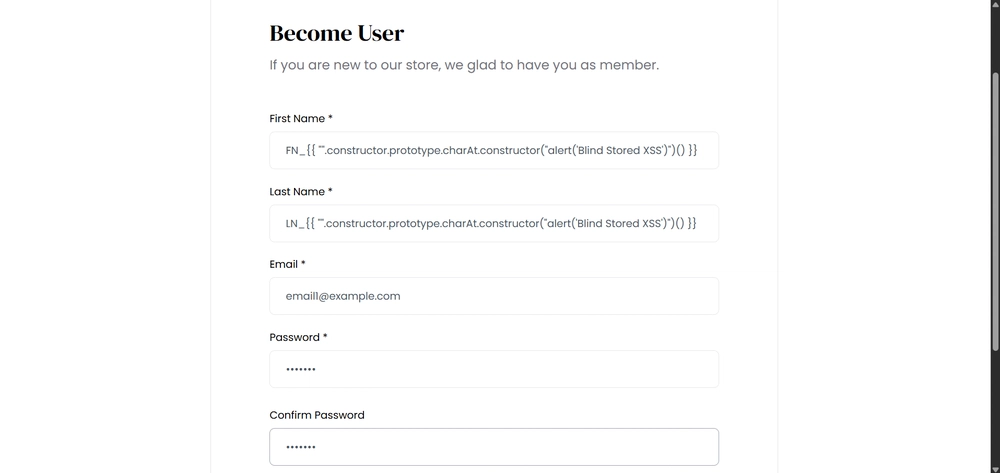
2. Log into the administration panel. Navigate to Customers via the left sidebar menu to confirm that the newly registered account appears in the list.
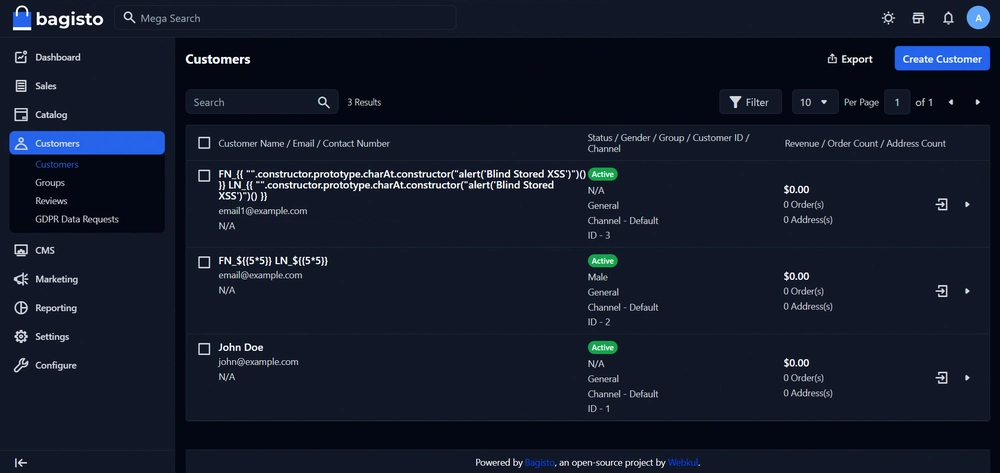
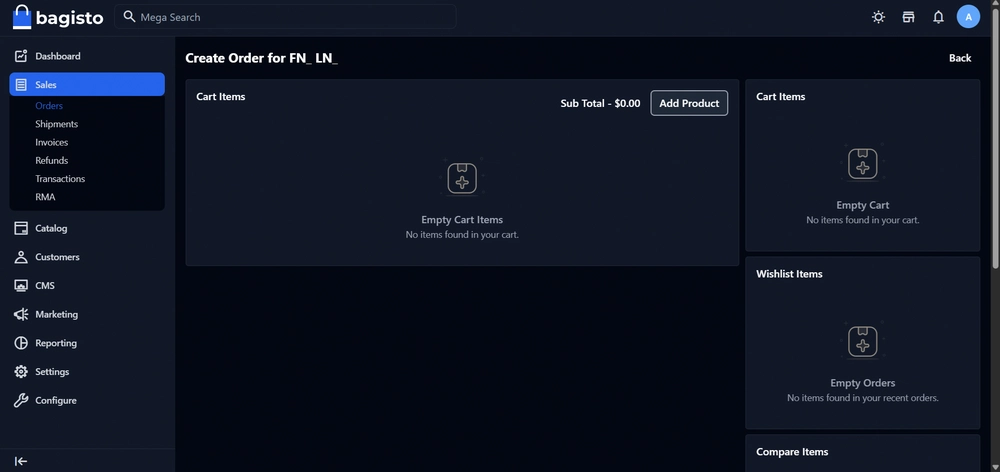
3. View the details of the newly created customer and click the Create Order button.
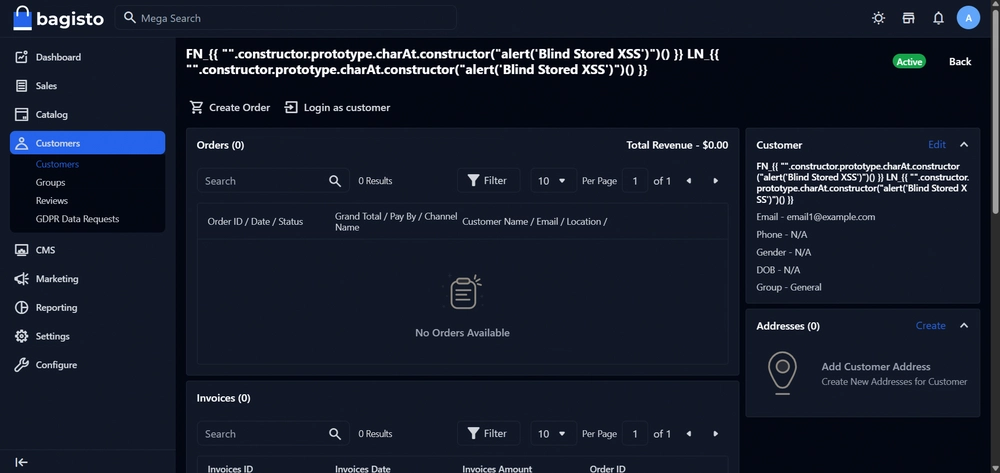
4. Upon page load, the Stored Cross-Site Scripting (XSS) via Client-Side Template Injection (CSTI) executes successfully. Because the payload was inserted into both the first and last name fields, the JavaScript executes twice in succession.
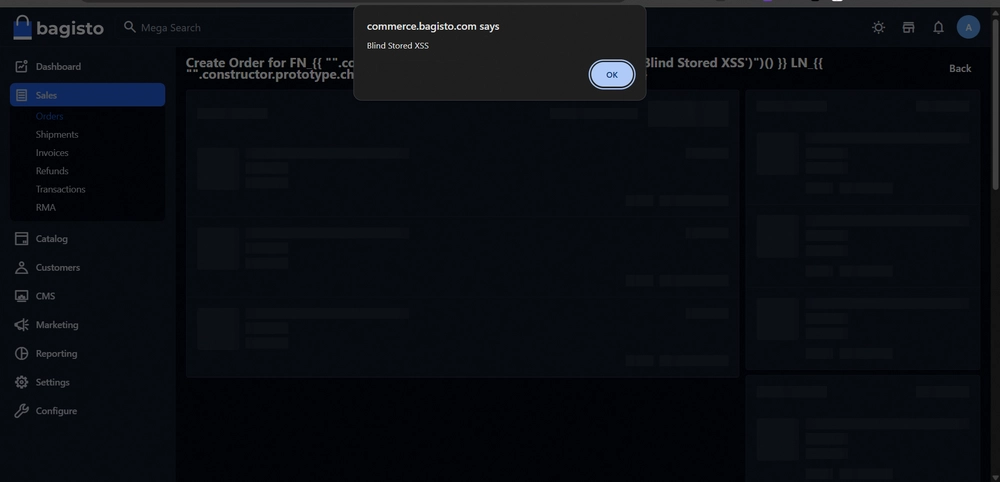
5. After dismissing both alert pop-ups, the customer's name fields appear blank in the UI. This occurs because the payload expression evaluates to undefined upon execution, causing the Vue.js template engine to render an empty string.
Timeline
- 31 March 2026: Initial discovery of a vulnerability in Bagisto v2.4.1 using their Live Demo instance. Created a ticket for the Webkul support team and sent the full PoC report.
- 2 April 2026: Received a reply from the Webkul support team claiming they were already aware of the reported issue and actively working on a fix. I replied stating that my goal was to request a CVE ID for the discovered vulnerability.
- 6 April 2026: The Webkul support team did not consider the submitted report valid for a CVE. I then contacted MITRE regarding the vulnerability and applied for a CVE, but received no reply after waiting for several weeks.
- 14 May 2026: Decided to contact VulnCheck to request assistance with Coordinated Vulnerability Disclosure (CVD) and the assignment of a CVE ID.
- 19 May 2026: VulnCheck replied that the vulnerability had already been identified under CVE-2026-21449 - Bagisto has SSTI via first and last name from low-privilege user (not admin). I replied stating that the CVE record was specific to Bagisto versions prior to 2.3.10, whereas mine was a CSTI affecting Bagisto versions before 2.4.1. I noted that if it were an SSTI vulnerability, it would have triggered a 500 Internal Server Error; instead, I received an alert box pop-up indicating it was entirely client-side.
- 8 July 2026: Followed up with VulnCheck in the same email thread to ask for an update on their decision. I provided proof from patch diffing and confirmed that the vulnerability exists in versions prior to 2.4.4. VulnCheck replied, asking me to confirm that the finding was not addressed by CVE-2026-21449 and requesting a specific Pull Request or commit file.
- 9 July 2026: Replied to VulnCheck with the URL link to the exact commit that patched the vulnerability by adding
v-pretocreate.blade.php. - 10 July 2026: VulnCheck thanked me for clarifying the distinction between the fix in CVE-2026-21449 and my report, and subsequently published CVE-2026-60120. I then publicly disclosed the vulnerability in my CVE-Disclosures repository on GitHub, LinkedIn, and on this CVE blog. VulnCheck also updated the vendor field from "bagisto" to "Webkul".
See you in the next hack.
@aaronamran
July 2026